How We Built a Customer Support Agent That Actually Learns, with Hindsight and Google’s ADK
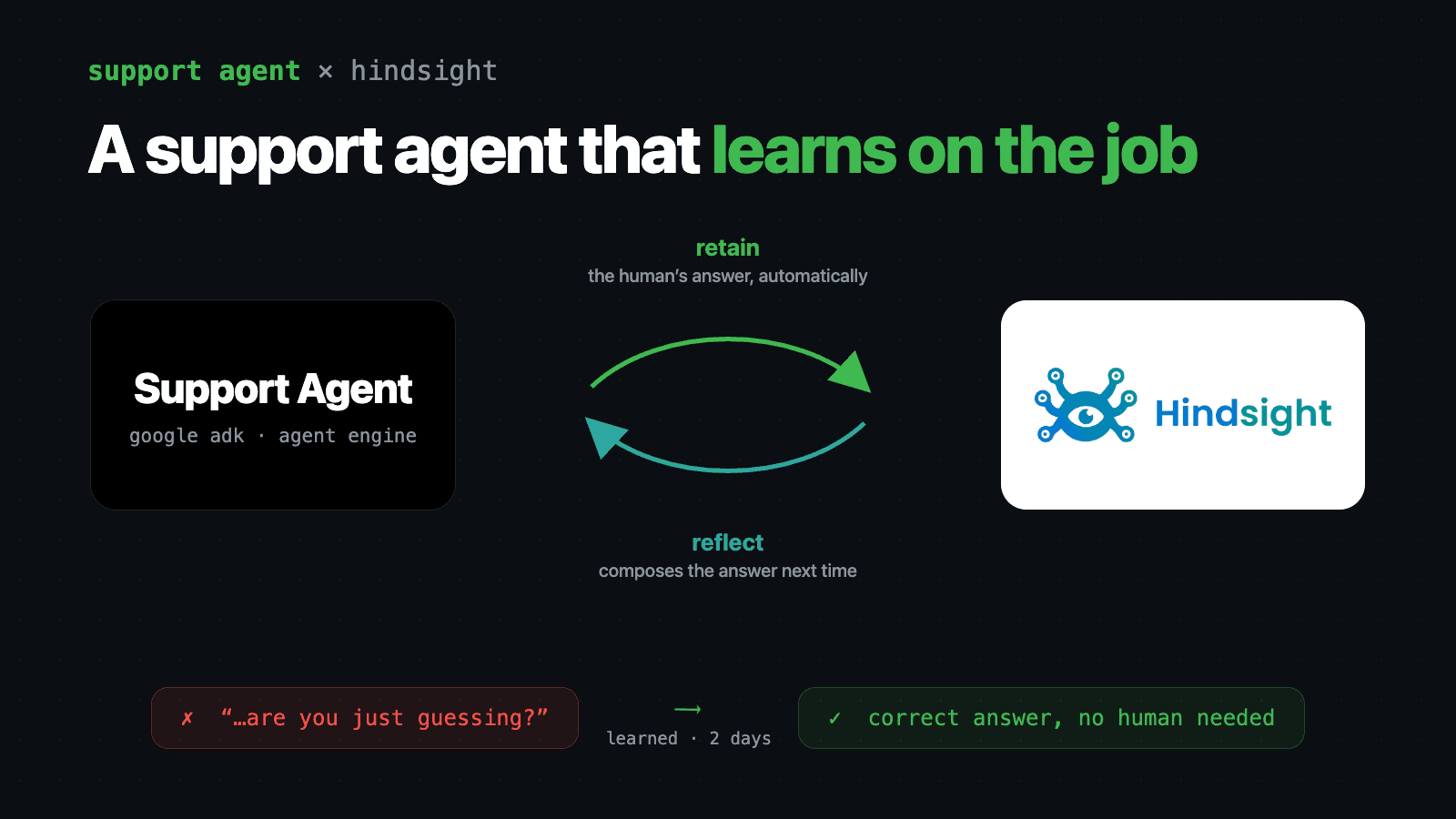
A customer opened a support ticket on Hindsight Cloud at 2:41 PM: “I want to change my user email.”
Our AI support agent answered first, as it always does. It knew that billing contact emails exist and can be changed, so it pointed her at the billing settings — and then at an /account section that doesn’t exist. When she asked where to find it, the agent doubled down with directions to “the Settings link, typically located in the left-hand navigation bar.” There is no left-hand navigation bar.
Customer: … there is no left-hand nav bar, are you just guessing?
Yes. It was.
The agent apologized and escalated. Three minutes of AI confidence, then a human (me) picked up the ticket an hour later and gave the real answer: you can’t change your email address. The email is the primary key in our database. What you can do is invite the new address via the Team Members page, promote it to org Owner, and delete the old user — or start a fresh org on the new address. The customer thanked me and moved on.
Two days later, a different customer asked the same question: “how to change user email address?” Here’s what the agent said, with no human in the loop:
To update your primary account email address, you’ll need to use the team-based migration process, as there isn’t a direct “edit email” setting.
- Invite your new email: Go to the Team Members page in your Hindsight Cloud dashboard and send an invitation to your new email address.
- Assign permissions: Once the new email account has accepted the invite, promote it to the Owner role.
- Remove the old account: After verifying your new account has full access, you can remove your old user account from the organization.
Please note that the email preferences page in the dashboard is only for managing notification settings and cannot be used to change your login email.
No deploy. No prompt change. No fine-tune. Nobody edited a knowledge base. The agent learned the answer from watching a human give it once — and it didn’t just parrot my reply, it restructured a freeform two-message ticket reply into numbered steps and proactively headed off the misconception that started the whole mess.
This post is the full build: a customer support agent on Google’s Agent Development Kit (ADK), deployed to the managed Agent Engine runtime on Google Cloud, with Hindsight as the memory layer that makes the learning loop work.
TL;DR
- The agent is built with google-adk 2.x, runs
gemini-3.1-flash-lite, and deploys to Vertex AI Agent Engine (Agent Runtime) as areasoningEngine— we had a GKE cluster available and chose the managed runtime anyway. - Memory is two Hindsight banks:
hindsight-cloud-product-kb(shared product knowledge, read-only from conversations) andhindsight-cloud-interactions(every user’s conversation memory in one bank, isolated by tags). - The knowledge bank is seeded from our docs sites by walking their sitemaps — each page retained as a document with a stable ID, so re-runs upsert instead of duplicating.
- The learning loop is one function: every human support reply is automatically retained as a (question, answer) pair into the product bank. That’s how the email-change answer got in. There’s also a “Teach the agent” box in our admin UI and a feedback tool the agent calls on its own.
- The agent has eleven account tools (billing, usage, members, API keys) that execute against the customer’s own org via a short-lived delegated token — the agent never holds a cross-tenant credential.
Why the Wrong Answer Happened
The first answer wasn’t a wild hallucination. It was worse: plausibly wrong. The agent knew billing emails were a real, changeable thing. It misread the intent — the customer wanted to change her login identity, not her invoice recipient — and then filled the gaps in its UI knowledge with statistically likely furniture: a /account section, a left-hand nav.
Customers catch this immediately. “Are you just guessing?” is the moment trust dies, and it’s the default failure mode of every support bot that answers from model weights plus a static RAG index. The email-migration procedure lives in no documentation page. It’s tribal knowledge: the kind of answer that exists only in a support engineer’s head until the day someone writes it down.
Our requirement was never “deflect more tickets.” It was: when a human answers a question once, the agent should know that answer forever. That’s a memory problem, and it’s the specific problem Hindsight is built for.
The Stack
- Google ADK (
google-adk≥ 2.0) — the agent framework. We started from the public adk-samples customer-service agent and adapted it. gemini-3.1-flash-lite— the model. Flash-lite is enough because the hard knowledge lives in memory, not in the model. The model’s job is intent, tool selection, and composition.- Vertex AI Agent Engine on Google Cloud — the managed runtime. The agent deploys as a
reasoningEngineresource. - Hindsight Cloud — the memory layer, wired in through the official
hindsight-google-adkintegration package plus thehindsight-clientSDK for direct calls.
We run production Kubernetes clusters all day — the rest of Hindsight Cloud lives on GKE. For the agent we picked the managed runtime instead, and the deployment script is the argument for it:
import vertexai
from vertexai import agent_engines
from vertexai.preview.reasoning_engines import AdkApp

from hindsight_customer_service.agent import root_agent

app = AdkApp(agent=root_agent, enable_tracing=True)

remote = agent_engines.create(
    agent_engine=app,
    display_name="hindsight-support-agent",
    requirements=[
        "google-cloud-aiplatform[agent_engines]>=1.93.0",
        "google-adk>=2.0.0",
        "hindsight-google-adk>=0.1.0",
        "hindsight-client>=0.7.0",
        # ...
    ],
    extra_packages=["hindsight_customer_service"],
)
That’s the whole deployment story: wrap the ADK agent in an AdkApp, call agent_engines.create(), and the runtime handles provisioning, scaling, and credentials. The agent calls Gemini with the runtime service account’s own identity (GOOGLE_GENAI_USE_VERTEXAI=1) — no model API key to manage; the only secret it carries is the Hindsight API key. No Dockerfile, no Helm chart, no rollout to babysit. For a component that a small team owns alongside a dozen other responsibilities, that trade was easy.
One wiring detail worth copying: our cloud backend resolves the deployed agent by display name at startup — it lists engines and picks the most recently updated match. No resource ID to thread through Terraform on every redeploy.
Architecture
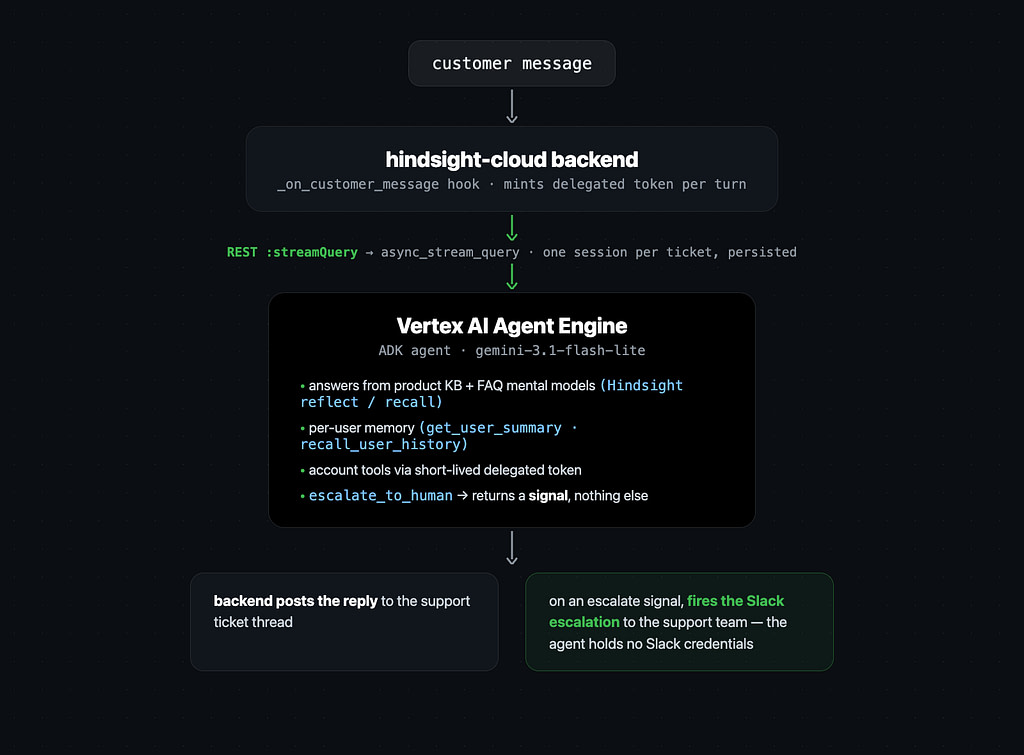
When a customer posts a message, our backend’s _on_customer_message hook invokes the deployed agent over plain REST — a POST to the engine’s :streamQuery endpoint with class_method: "async_stream_query" — so the backend needs httpx and google-auth, not the full google-cloud-aiplatform SDK. The first message on a ticket creates an Agent Engine session and persists its ID on the ticket; every later message reuses it, so multi-turn context comes for free.
The escalation design is the piece I’d recommend most strongly: escalate_to_human is a signal, not an action. The tool returns {"status": "escalated", "priority": ...} and nothing else. The backend watches the event stream, sees the tool call, posts the “a human will follow up” message in the thread, and fires our existing Slack escalation with the agent’s conversation summary. The agent holds no Slack credentials and can’t page anyone directly. The blast radius of a confused model stays inside the chat.
Two Banks, Deliberately
All memory goes through Hindsight, split across two banks with different trust models:
hindsight-cloud-product-kb holds product knowledge: documentation, FAQ source material, and learned lessons. Inside a conversation the agent gets hindsight_recall and hindsight_reflect over this bank — but not hindsight_retain:
from hindsight_google_adk import create_hindsight_tools

def get_product_knowledge_tools():
    return create_hindsight_tools(
        bank_id="hindsight-cloud-product-kb",
        hindsight_api_url=configs.hindsight.api_url,
        api_key=configs.hindsight.api_key,
        # Answer product questions thoroughly from memory; never write to
        # the shared knowledge bank from inside a conversation.
        include_retain=False,
        include_recall=True,
        include_reflect=True,
        budget="high",
    )
The two read tools divide the work: hindsight_reflect is the agent’s primary for product questions — it synthesizes an answer from the facts in the bank, rather than returning stored text — and hindsight_recall is the fallback for pulling the most relevant raw facts when the agent wants sources instead of a composed answer. The agent’s instructions tell it to hit one or the other on every product question, including short follow-ups, instead of answering from conversation history.
include_retain=False is a one-line decision that matters a lot: no conversation can pollute the shared knowledge bank. A confused customer (or a malicious one) can’t teach the agent something wrong just by chatting with it. Writes to this bank happen only through the controlled paths described below.
hindsight-cloud-interactions holds every user’s conversation memory — in a single bank. We don’t create a bank per user. The HindsightMemoryService (an ADK BaseMemoryService from hindsight-google-adk) tags every retain with user:{user_id} and filters every recall by that tag:
from hindsight_google_adk import HindsightMemoryService

def get_memory_service():
    return HindsightMemoryService.from_url(
        hindsight_api_url=configs.hindsight.api_url,
        api_key=configs.hindsight.api_key,
        # Static bank name shared by all users (no {user_id} placeholder).
        bank_id_template="hindsight-cloud-interactions",
        # Require the user tag to match on recall, so memories never leak
        # across users even though they live in one bank.
        recall_tags_match="all",
        mission=USER_MEMORY_MISSION,
        budget="mid",
    )
Users stay isolated; operations stay simple. One consolidation schedule, one bank to monitor, no per-user provisioning.
One production lesson: Agent Engine has no end-of-session hook, so we retain the conversation every turn from an after_agent callback. Support conversations are short — often one or two turns — and an end-of-session retain that never fires means an interaction bank that never receives writes. Retention upserts by session.id, so retaining every turn just updates one document per ticket instead of creating duplicates.
Seeding the Knowledge Bank
The agent’s baseline knowledge is our documentation, seeded by a script that walks the sitemaps of both docs sites — the engine docs and the cloud docs — and retains each page as its own document:
await client.aretain(
    bank_id="hindsight-cloud-product-kb",
    content=page_text,
    document_id=f"hindsight-engine-docs:{path}",  # stable per page
    update_mode="replace",                        # re-runs upsert, not duplicate
    retain_async=True,                            # server-side extraction queue
)
Two details earned their place the hard way:
- Stable document IDs with
update_mode="replace". The seeder runs on a schedule. Every run upserts the same per-page documents, so the bank tracks the docs without accumulating stale copies. - Walk the sitemap, not the export file. The first version seeded from the docs site’s single
/llms-full.txtexport — which, it turns out, is generated from only part of the docs tree and silently omitted every per-integration page. The result was an agent that confidently answered “how do I connect tool X” questions without the integration guidance for tool X. Exactly the plausible-but-wrong failure mode from the opening anecdote, mass-produced. Page-level seeding fromsitemap.xml(filtered to the authoritative sections — developer docs, SDKs, guides, FAQ — and skipping blog posts and old pinned versions) fixed it.
The Learning Loop
Here’s the part that turned the opening anecdote from an embarrassment into a feature. There are three ways knowledge enters the product bank, and all three end in the same one-shot aretain call.
1. Every human answer is captured automatically
In the backend, after every support-team reply in a ticket, this fires:
content = (
    "Support Q&A from a human teammate (use to improve future answers).\n"
    f"Customer question: {question}\n"
    f"Human answer: {answer}"
)

await client.aretain(
    bank_id="hindsight-cloud-product-kb",
    content=content,
    context="support-human-answer",
    tags=["support_human_answer", f"ticket:{ticket_number}"],
    retain_async=True,
)
That’s it. That’s the highest-leverage code in the system. When I typed the email-migration answer into the ticket thread, this hook paired my reply with the customer’s most recent message and retained it into the product bank. Hindsight’s extraction pulled the facts out — there’s no direct email change; email is the primary key; the migration path is invite → promote to Owner → delete old user. Two days later, when a different customer asked the identically-shaped question, the agent’s hindsight_reflect call synthesized those facts into the answer you saw above. That’s also why the answer didn’t read like a copy of my reply: reflect doesn’t return stored text, it composes an answer from the facts in the bank — which is how a freeform ticket reply came back out as clean numbered steps with the notification-settings caveat attached.
Nobody on the team did anything. Answering the ticket was the training step.
2. The agent records lessons about its own answers
The agent has a record_answer_feedback tool it’s instructed to call when a customer signals an answer was helpful or wrong — or when it has to escalate because it couldn’t answer:
await get_hindsight_client().aretain(
    bank_id="hindsight-cloud-product-kb",
    content=f"Support answer lesson ({rating}). Topic: {topic}. {lesson}",
    context="answer-feedback",
    tags=["lesson", f"rating:{rating}"],
    retain_async=True,
)
Lessons are generalized and anonymized before they’re stored — the tool’s instructions forbid user-specific details, and a redaction layer strips the current user’s name, email, org, and account identifiers (plus anything that matches an email regex) as defense in depth. The shared bank learns “the email preferences page is only for notifications, don’t point people there for login changes,” never “Sarah from Acme had this problem.”
3. Operators can teach it directly
The Hindsight Cloud admin UI has a “Teach the agent” box: a topic, a guidance field, one button. It lands in the same bank through the same retain call, tagged support_operator_teach:
await client.aretain(
    bank_id="hindsight-cloud-product-kb",
    content=f"Operator-curated guidance for the support agent.\nTopic: {topic}\nGuidance: {guidance}",
    context="support-operator-teach",
    tags=["support_operator_teach", f"topic:{topic[:60]}"],
    retain_async=True,
)
We didn’t need it for the email-change lesson — the automatic capture handled that. Teach is for getting ahead of tickets: when we ship a feature or notice a confusing UI corner, anyone on the team can preload the answer before the first customer ever asks.
The knowledge stays coherent on its own
A pile of Q&A pairs and lessons isn’t knowledge — it’s a pile. This is where Hindsight’s consolidation does the quiet work: observations get deduplicated and reconciled in the background, and mental models (stored reflect queries) re-run automatically when consolidation changes the bank, because we create them with a refresh_after_consolidation trigger.
We use mental models for FAQs. A get_faq_answers tool serves precomputed, always-current answers to the most common questions — no live retrieval needed. And the agent has a create_faq tool: when it notices a general question that isn’t covered, it can promote that question into a new FAQ mental model on its own. The FAQ list literally grows out of what customers ask, and every FAQ answer silently absorbs new lessons as they consolidate in.
Knowing the Customer, Not Just the Product
The interaction bank powers two per-user tools. get_user_summary reads a per-user mental model — created lazily the first time a user shows up, tagged user:{user_id} so its background reflect only draws from that user’s memories:
client.create_mental_model(
    "hindsight-cloud-interactions",
    name=f"Summary of user {user_id}",
    source_query=(
        "Summarize what is known about this user from past conversations: "
        "their plan and use case, environment and setup, recurring problems, "
        "preferences, and how previous support requests were resolved. "
        "Be concise and factual."
    ),
    tags=[f"user:{user_id}"],
    trigger={"refresh_after_consolidation": True},
    id=f"user-summary-{user_slug}",
)
recall_user_history handles the specifics the summary doesn’t cover (“what did they ask about last week?”) with a tag-scoped recall. A returning customer doesn’t have to re-explain their setup, and the agent’s answers get quietly better calibrated to each user’s plan and history.
Account Tools Without a Cross-Tenant Key
Product knowledge answers “how does X work.” Support tickets are usually “why doesn’t X work for me” — and that needs live account state. The agent has eleven tools that query the customer’s own organization: get_billing_summary, get_credit_balance, get_usage_summary, get_recent_transactions, list_my_banks, get_bank_stats, list_org_members, list_api_keys, list_pending_invites, get_bank_audit_logs, and one write action, create_api_key.
The obvious way to build this is to give the agent an admin credential. We didn’t:
- The cloud API mints a short-lived delegated token once per reply turn — bound to the requesting user, their org, and the specific ticket, with a five-minute default TTL — and threads it into the agent runtime as session state.
- Each tool reads the token from session state and POSTs to a dedicated agent-tools endpoint on the cloud API.
- The server re-verifies the token, re-checks the user’s live role (the role in the token is only a hint), confirms the requested resource lives in the user’s org, and audit-logs every invocation.
- If there’s no token in session state — feature flag off, unauthenticated chat, mint failure — the tools return a polite “I can’t pull that right now” and the agent falls back to escalation.
All eleven tools are registered unconditionally; authorization is enforced server-side per call. The agent never holds a credential that could touch another tenant, and every account access it makes is attributable to the customer who asked.
What to Steal
If you’re building a support agent — on ADK or anything else — these are the decisions that mattered most:
- Auto-retain human answers. One hook, a few dozen lines, and every escalation becomes training data. This is the single highest-leverage piece of the system, and it’s the reason the opening anecdote resolved itself in two days with zero process.
- Split knowledge and interactions into separate banks, and make the knowledge bank read-only from conversations. Learning goes through controlled paths; chatting isn’t one of them.
- Escalation as a signal, not an action. Let the backend own the side effects.
- Seed from the sitemap with stable document IDs. Your knowledge base is only as good as its most-silently-missing section.
- Take the managed runtime. We had the k8s cluster and the platform team, and
agent_engines.create()still won.
The agent runs in production today as the first responder on every Hindsight Cloud support ticket. It still escalates plenty — that’s by design — but every escalation it hands off comes back as knowledge it keeps. The gap between “the agent got this wrong” and “the agent gets this right forever” is one human answer.
If you want the same loop in your own agent, the Hindsight + Google ADK integration guide covers the memory service and tools used here, and Hindsight Cloud is the fastest way to stand up the memory layer. The ADK sample we started from is in google/adk-samples.