Codex vs Claude Code 2026: Plans, Memory, Which to Pick
Say Lena tells Claude Code on Monday to "remember that the API tests require a local Redis instance." Claude Code saves the note under ~/.claude/projects/<project>/memory/. On Tuesday she opens Codex CLI in the same repository. It reads ~/.codex and the AGENTS.md files, never sees Monday's note, and the tests fail.
That gap is what most Codex vs Claude Code comparisons skip. I compare Codex CLI and Claude Code here. "Codex" also names five other surfaces: the ChatGPT desktop, mobile and web apps, the IDE extension and Codex Cloud.
You've probably felt this. An agent learns something in one session, and the next session starts blank. This page compares Codex vs Claude Code on plans, instruction files, what each keeps between sessions, and which fits which task. It ends with how to keep one memory across both.
The short answer: both are terminal coding agents, Claude Code from Anthropic and Codex CLI from OpenAI. Each starts from a file a person writes, CLAUDE.md or AGENTS.md. Pick by the plan you already pay for and the task in front of you. Memory is the part they don't share.
I build Hindsight, which adds memory to both tools with the Hindsight Coding Agents plugin, and every fact below comes from each tool's own docs, read in November 2026. For the basics, start with AI agent memory, or see how one install gives both tools the same memory.
Codex vs Claude Code: what each tool is
Claude Code is Anthropic's coding agent. Its docs live at code.claude.com/docs. Codex CLI is, in the README's words, "a coding agent from OpenAI that runs locally on your computer" (github.com/openai/codex). The CLI docs say you "work against your local repository."
Both run in your terminal. You give each one a task. It reads files, edits them, runs commands, and you review the result. Claude Code reaches you through a Claude plan or the Anthropic API. Codex CLI reaches you through a ChatGPT plan or an API key. The plan details come in the next section.
Codex Cloud is a different surface, and a reader who searches Codex vs Claude Code may mean it. OpenAI's docs say: "Each task has its own workspace and can keep working while your computer is asleep." You set up an environment for it first. This page compares the CLI, not Cloud, because the CLI is the tool that sits in a terminal beside Claude Code and reads files on your machine.
The comparison matters because the two tools do the same job and differ in the files and stores around the job. The next sections cover those differences one at a time.
Where Gemini CLI fits
You may also weigh Google's tool. Google's docs state that "Gemini CLI was replaced by Antigravity CLI on June 18th, 2026" for unpaid tier and Google One users, so I mean Gemini CLI here and no other product. It reads GEMINI.md: first ~/.gemini/GEMINI.md, then files in your workspace directories and their parents. It concatenates them and sends them with every prompt, and context.fileName can add AGENTS.md to the list (Gemini CLI docs). Same idea, third file name.
Claude Code vs Codex plans and prices, as of November 2026
Both tools ride on a subscription you may already have. All prices below are as of November 2026, from Claude's pricing page and OpenAI's Codex pricing page.
| Tool | Plan | Price | Includes the tool |
|---|---|---|---|
| Claude Code | Free | $0 | No |
| Claude Code | Pro | $20 a month, or $17 a month billed annually | Yes |
| Claude Code | Max | $100 a month | Yes |
| Claude Code | Ultra | $200 a month | Yes |
| Claude Code | Team standard seat | $25 a seat monthly, $20 billed annually | Yes |
| Claude Code | Team premium seat | $125 a seat monthly, $100 billed annually | Yes |
| Claude Code | Enterprise | US$20 a seat a month, billed annually, 20 seat minimum, plus usage at API rates | Yes |
| Codex | ChatGPT Free | $0 | Yes |
| Codex | ChatGPT Go | $8 a month | Yes |
| Codex | ChatGPT Plus | $20 a month | Yes |
| Codex | ChatGPT Pro | From $100 a month ($100, $200 or $500) | Yes |
| Codex | ChatGPT Business | $20 per user a month billed annually ($25 monthly) | Yes |
| Codex | Enterprise and Edu | Contact sales | Yes |
The first difference is the entry point. Claude Code is not in the Claude Free plan. Codex is in ChatGPT Free and Go. If you pay for nothing yet, that decides where you can start today.
The second is how usage limits work, and the two vendors word it differently. Claude says: "Pro and Max plans have a five-hour session limit and a weekly limit. Ultra plans have a weekly limit, and verified Ultra accounts don't have a five-hour session limit." OpenAI says: "Pro plans currently have no five-hour limit." On both sides, the chat app and the coding tool draw on one pool. Claude's limits article states that "all activity in both tools counts against the same limits." OpenAI's page states that "ChatGPT Work and Codex share pricing, credits, and usage limits."
For cost in practice, the Claude Code costs page gives "around $13 per developer per active day" for enterprise deployments, with 90 percent of users below $30 a day. That's a deployment average, not a plan price. Don't read it as what Pro costs you.
CLAUDE.md vs AGENTS.md: how each tool loads its instructions
Start with what's simple. Each tool reads a markdown file that a person writes, at the start of a session. The file holds rules such as your test command, your code style and the folders to leave alone. The two tools differ in where they look and how much they read.
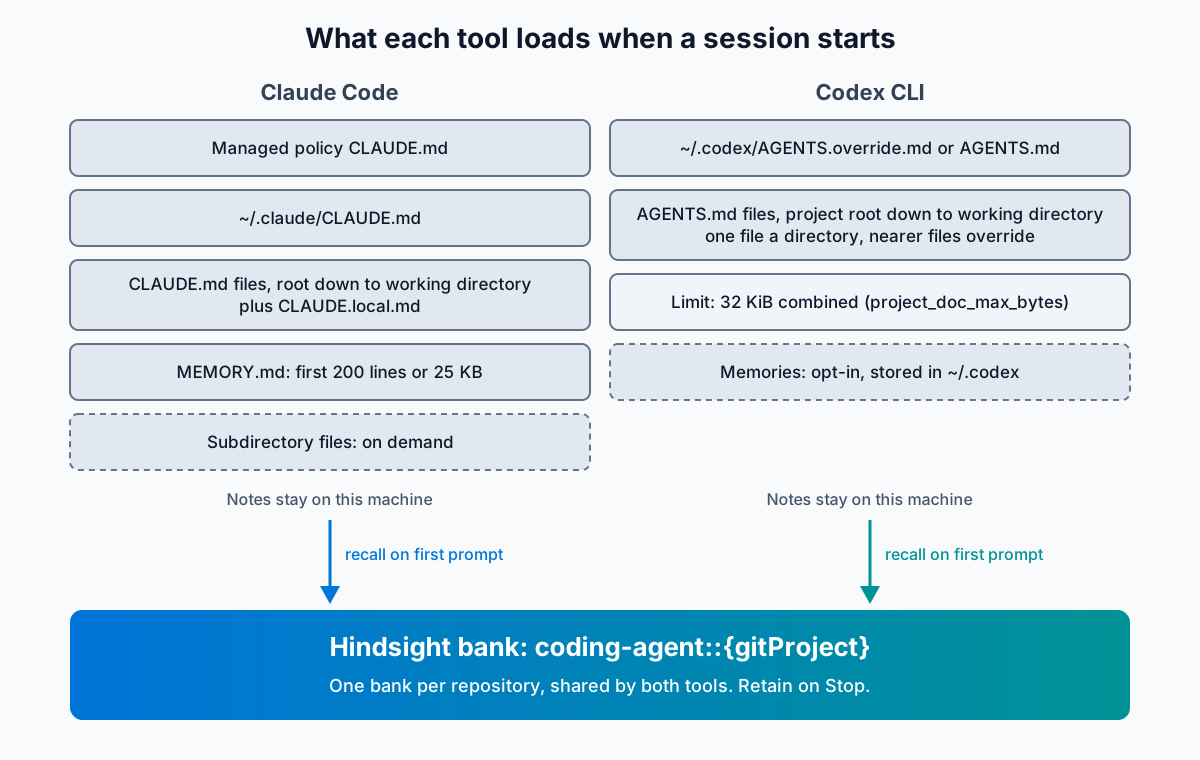
Claude Code loads CLAUDE.md and CLAUDE.local.md from your working directory and every directory above it, ordered from the filesystem root down. Your personal file is ~/.claude/CLAUDE.md. Files in subdirectories load on demand, "once Claude reads, writes, or edits another file in that subdirectory." The docs advise "under 200 lines" a file, and Claude Code skips a file over 4 MiB. The @path/to/import syntax pulls in other files, up to four hops deep (Claude Code memory docs).
Codex CLI reads ~/.codex/AGENTS.override.md if it exists, and AGENTS.md if it doesn't. Then it starts at the project root and walks down to your working directory, taking at most one file per directory. Files nearer your working directory come later, so they override earlier guidance. Codex stops adding files once the combined size reaches project_doc_max_bytes, 32 KiB by default (Codex AGENTS.md docs).
That's the difference that matters. Claude Code walks up from where you are and loads deeper files when it touches them. Codex walks down from the root and stops where you are.
Say your team runs both tools on one repository. Keep one AGENTS.md, and make your CLAUDE.md import it with one line:
@AGENTS.md
Claude Code's docs define the import syntax. The import line pulls AGENTS.md into CLAUDE.md. If your Codex rules grow past 32 KiB, raise the limit in ~/.codex/config.toml, as the Codex docs example does:
project_doc_max_bytes = 65536
Here's where I'd stop and say the quiet part. Both files are memory a developer writes by hand. They hold what you remembered to write down, on the day you wrote it. They don't learn from what happened in the last session. If you want the Claude Code side in depth, read my guide to Claude Code memory.
What Codex and Claude Code remember between sessions
Both tools now keep some notes of their own. They keep them in different places, for different lengths of time, under different switches. I take each tool in turn, then put them in one table.
Memory in Claude Code
Claude Code has three layers. The first is CLAUDE.md, covered above. The second is auto memory, which Claude writes. The third is the session transcript, which lets you resume.
Auto memory keeps notes of four types: user, feedback, project and reference. It skips anything Claude can derive from the codebase and anything your CLAUDE.md already says. The layout is a MEMORY.md index plus one topic file per memory. The first 200 lines or 25 KB of MEMORY.md load at the start of every conversation, and topic files load on demand. The folder path comes from the git repository, so worktrees and subdirectories share one folder. The docs say: "Auto memory is machine-local." Subagents don't get the main conversation's auto memory, except forks.
You add a note by asking. The docs give the example "always use pnpm, not npm": Claude saves it to auto memory. To put it in CLAUDE.md instead, say "add this to CLAUDE.md" or edit the file through /memory. That command also lists your memory file locations and toggles auto memory. You can switch auto memory off with autoMemoryEnabled: false or CLAUDE_CODE_DISABLE_AUTO_MEMORY=1.
Transcripts are saved to ~/.claude/projects/<project>/<session-id>.jsonl. claude --continue reopens the most recent session in the current directory. claude --resume opens a picker. Claude Code deletes transcripts after 30 days by default (cleanupPeriodDays, minimum 1). Auto memory files stay until you or Claude edits or deletes them (the Claude Code memory docs, sessions, settings).
Memory in Codex CLI
Codex CLI also has three layers: AGENTS.md, memories and history. The memories layer is opt-in. OpenAI's docs say: "Local Codex memories are off by default." You turn them on with memories = true under [features], or with "Enable Codex memories" in the desktop app (Codex memories page).
Codex stores memories under ~/.codex. It "waits until a chat has been idle long enough to avoid summarizing work that's still in progress," so it skips active and short-lived sessions. It redacts secrets from generated memory fields. The settings memories.generate_memories, memories.use_memories and memories.extract_model control what Codex writes, what it reads, and which model extracts. "Delete Codex memories" resets the store of the selected machine.
For resuming, codex resume reopens a recent chat from the current repository, or searches across local chats. codex resume --last skips the picker. codex fork forks a previous session. Codex saves local transcripts in ~/.codex/history.jsonl. history.persistence = "none" turns that off, and history.max_bytes caps the file by dropping the oldest entries (Codex CLI docs).
The two side by side
| Feature | Claude Code | Codex CLI |
|---|---|---|
| Instruction file | CLAUDE.md | AGENTS.md |
| Notes the agent writes | Auto memory: MEMORY.md plus topic files. | Memories. Off by default. Turn on with memories = true under [features]. |
| Where notes live | ~/.claude/projects/<project>/memory/ | ~/.codex |
| Scope | One machine, one git repository | One machine |
| What loads | First 200 lines or 25 KB of MEMORY.md each session | Set with memories.use_memories and memories.generate_memories |
| Resume a session | claude --continue, claude --resume | codex resume, codex resume --last |
| Transcripts kept | 30 days by default (cleanupPeriodDays, minimum 1) | ~/.codex/history.jsonl, capped by history.max_bytes, oldest entries dropped |
Picture Tomás. He returns to a Claude Code session after 42 days and runs claude --resume. The transcript is gone, because Claude Code keeps transcripts 30 days by default. His auto memory notes are still there, because the transcript cleanup doesn't remove them. On Codex CLI he never set memories = true, so Codex wrote no memories. Each tool kept something different, for a different time, on the same laptop.
OpenAI's memories page says it directly: "Keep required team guidance in AGENTS.md or checked-in documentation." That's the right advice for a rule. It also means a lesson from a failed run has no home unless you write it into a file yourself.
Neither tool reads the other's notes. Each store sits in its own folder on the machine that wrote it. A second laptop starts with none of it. My post on memory for Codex covers the first Hindsight integration for Codex, a set of hook scripts. For a wider look at the stores people add on top, read agent memory systems compared.
Codex vs Claude Code: which one fits your task
My position: pick on the plan you already pay for and the task in front of you, then give both tools the same memory. Don't pick on a benchmark that changes next month, and don't treat the choice as permanent. Use this table as a starting point.
| If you... | Start with |
|---|---|
| Pay for ChatGPT, or pay nothing yet | Codex CLI, which is in ChatGPT Free and Go |
| Pay for Claude Pro, Max, Ultra, Team or Enterprise | Claude Code |
| Want a task to keep running while your laptop sleeps | Codex Cloud, a different surface from the CLI |
| Keep large instruction files | Claude Code skips a file only above 4 MiB. Codex stops at 32 KiB combined unless you raise project_doc_max_bytes. |
| Want the agent to take its own notes with no setup | Claude Code writes its own notes. Codex needs memories = true. |
| Keep team rules in AGENTS.md already | Codex CLI reads it directly. Claude Code needs the @AGENTS.md import line. |
You don't have to choose one for good. You can run both on one repository, one for a task and the other for a second look. The two instruction files can share text, as the import line shows. Memory is the part that doesn't cross over without a memory layer.
I'm not telling you to drop either tool. They differ in the places this page lists. If a task fits the way Codex runs or the way Claude Code runs, use it. Then ask what each one will know tomorrow.
How the Hindsight Coding Agents plugin works with both tools
Here's how I answer that question. Hindsight's Coding Agents plugin is one package for both tools. You install it per tool, from the Coding Agents page:
npx @vectorize-io/hindsight-coding-agents install claude-code
npx @vectorize-io/hindsight-coding-agents install codex
The install takes an explicit target. A bare install changes nothing and prints the choice. Here is what each target writes:
| Claude Code | Codex CLI | |
|---|---|---|
| Install target | claude-code | codex |
| Hooks | 3 hooks in ~/.claude/settings.json | 3 hooks in ~/.codex/hooks.json |
| MCP server | Added with claude mcp add at user scope | [mcp_servers] entry in config.toml, needs codex_hooks = true |
| Skill | ~/.claude/skills/hindsight-coding-agent | None listed |
| Config file | ~/.hindsight/coding-agent.json | ~/.hindsight/coding-agent.json |
| Memory bank | coding-agent::{gitProject} | coding-agent::{gitProject} |
The last two rows are the point. Both tools read one config file and write to one memory bank per repository. The Coding Agents page puts it this way: "this package uses one bank per repo (coding-agent::{gitProject}) shared by every agent." It also says the bank is the only state the integration keeps.
What happens in a session
There is no setup command for ingest. A repository's git history and conversations flow into its bank in the background as you work. By default, gitIngest takes commit messages only.
Recall runs on the first prompt of a session. autoInject defaults to "reflect", a memory synthesis that is injected into context. If that call times out or returns a 5xx, the plugin falls back to page search, then to recall. You can set autoInject to pages, recall or none.
Retain runs on Stop. retainSessions defaults to true, and hook harnesses write the transcript when the session stops. So you don't have to save a conversation by hand.
On Claude Code, the installed skill adds instructions for Claude. It tells Claude to search the bank's pages first for project questions and to use hindsight_reflect for "why" questions. It tells Claude to ingest a document for durable findings. And if Claude finds that a recalled memory is wrong, the skill tells it to ingest a correction, so the next session doesn't repeat the error.
You choose a server mode: cloud (the default, with an API token), self-hosted (with a URL), or a local daemon on 127.0.0.1:9077. Hindsight is open source under the MIT licence and runs on Postgres.
Now the proof. Hindsight states results from sdebench, a coding agent run over 61 real repository tasks, mean of 3 runs, with and without memory. "Every agent solves 60–61 of the 61 tasks either way." Memory changes what it costs to get there.
| Agent | Corrections, no memory to Hindsight | Cost a task, no memory to Hindsight |
|---|---|---|
| Claude Code | 0.85 to 0.36 | $0.445 to $0.338 |
| Codex CLI | 1.34 to 0.47 | $0.577 to $0.276 |
These figures measure corrections and cost, not accuracy. A correction is a time the harness sent the agent back with feedback after a failed check. Both rows come from the Coding Agents page, and for more on how Hindsight scores elsewhere, see the Hindsight benchmark results. If you'd rather read a wider comparison first, see Claude Code memory vs Mem0 vs Hindsight and memory MCP servers compared.
See the code and run it yourself: View Hindsight on GitHub.
Codex vs Claude Code: keep your memory when you switch
The reason to put memory outside the tool is simple. Claude Code keeps its notes under ~/.claude/projects/. Codex keeps its memories under ~/.codex. Neither reads the other's folder. If the notes live in the tool, a switch starts you at zero. If the notes live in a bank keyed to the repository, the switch costs one command.
Back to Lena. With the plugin installed for both tools, her Monday goes the same way, and her Tuesday changes. On Monday, Claude Code retains her session on Stop, Redis note included. On Tuesday, her first Codex prompt in the same repository recalls the Redis fact from the shared bank. Codex runs the tests with Redis up. She explains it once.
Here is the path if you start with Claude Code and want to try Codex later:
- Run
npx @vectorize-io/hindsight-coding-agents install claude-code. Work as you always do. Sessions are retained on Stop, and the repository's git history flows into its bank. - When you want to try Codex, run
npx @vectorize-io/hindsight-coding-agents install codex. The plugin needscodex_hooks = truefor Codex, per the Coding Agents page. - Open Codex CLI in the same repository. Your first prompt triggers recall from the same bank,
coding-agent::{gitProject}. The history from your Claude Code weeks is already there. - Keep going in either tool. Each Stop writes the session back to the bank, so what Codex learns reaches Claude Code the next time you open it.
The path runs the other way as well, because each install is per tool and both write to one bank. If you used the retired Claude Code or Codex plugins, add --import-conversations to the install line to bring that history across.
Two limits are worth knowing. First, the bank is portable across tools, but each tool's own notes stay where each tool put them. Your CLAUDE.md, AGENTS.md, auto memory and Codex memories are separate files, so keep the shared rules in one AGENTS.md with the import line from earlier. Second, in daemon mode the server listens on 127.0.0.1:9077, so the bank stays on that machine. For a second laptop, use cloud or self-hosted mode.
What to do next
- Pick the tool by the plan you pay for and the task you have.
- Keep one
AGENTS.md, and import it fromCLAUDE.mdwith@AGENTS.md. - Check
cleanupPeriodDaysfor Claude Code andmemories = truefor Codex, so you know what each one keeps. - Install one memory layer for both tools, so a lesson from one session reaches the other, and a switch between tools loses nothing.
Do those in that order. The first three take minutes. The fourth is one command a tool. If you want to see it before you commit, run it in self-hosted or daemon mode on your own machine. When you're ready to share a bank across laptops, create a Hindsight Cloud account and run the two install commands today. Your next Codex vs Claude Code session then starts with what the last one learned.
Frequently Asked Questions
Is Codex CLI open source?
Yes. The repository at github.com/openai/codex is licensed under Apache-2.0, and the licence file opens "Apache License, Version 2.0". As of November 2026 it shows 135.9k stars. The README installs it with npm install -g @openai/codex or brew install --cask codex. Anyone can read the source.
Which model does each tool use?
The Claude Code docs list Opus 5.5 as the default on Pro, Max, Ultra, Team, Enterprise and the Anthropic API. OpenAI's model page says that for most Codex tasks you should start with GPT-6.2 Sol. That's a recommendation, and the Codex docs name no default.
Can I use Codex or Claude Code with an API key instead of a plan?
Yes for Codex: "API-key sessions use separate API pricing, not your ChatGPT allowance." Claude Code's model docs name the Anthropic API as a provider. As of November 2026, Opus 5.5 costs $4 input and $20 output per million tokens, and GPT-6.2 Sol costs $2.00 and $10.00.
Does Codex use Claude Code?
No. Codex CLI is OpenAI's coding agent, licensed Apache-2.0. Claude Code is Anthropic's. Codex reads ~/.codex and AGENTS.md, while Claude Code reads ~/.claude and CLAUDE.md, so each keeps its own files, settings and stores. One memory layer, such as Hindsight, can serve both through its Coding Agents plugin.