Memory MCP Servers Compared 2026: 6 for Claude Code
Picture Maya. On Monday she adds a memory MCP server to Claude Code. On Wednesday the agent runs the same failed migration command it ran on Monday. It remembered the command. It didn't remember that the command failed. (Maya is an illustration, not a customer.)
An agent that forgets between sessions costs you time, and a memory MCP server is the usual fix. It gives the agent tools to save and fetch memory over the Model Context Protocol. You add one line to your client, and the agent can write facts down and read them back. This page compares six memory MCP servers: Hindsight, the reference Knowledge Graph Memory Server, Mem0, Supermemory, Graphiti and Basic Memory.
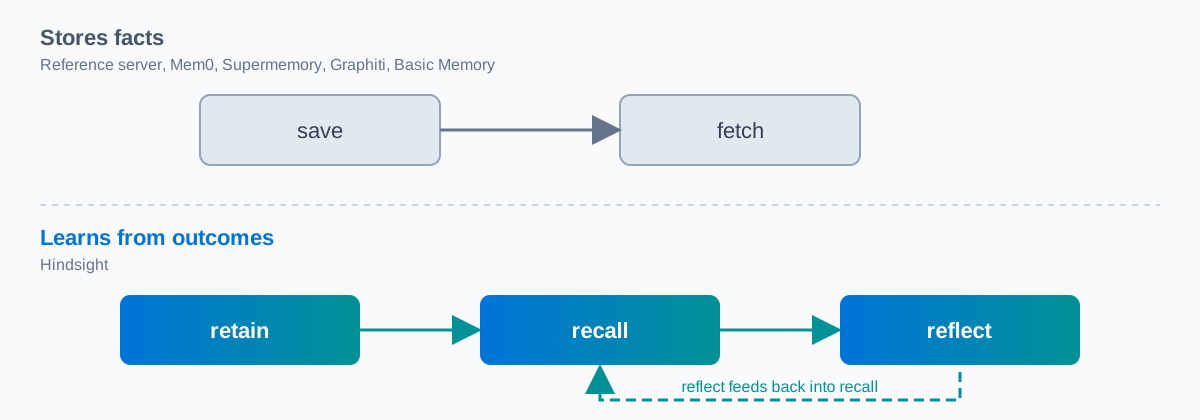
The short answer: all six store facts. Hindsight also learns from outcomes, through its retain, recall and reflect tools. Pick by what you need memory to do. If the idea is new to you, start with our explainer on AI agent memory. For the wider field, see our guide to agent memory systems compared.
We build Hindsight. Every fact about the other five servers comes from their own docs or repository, read in November 2026. We did not load-test any server. Below you'll find whether you need one, how one works, a table, each server in turn, how to choose, and the setup commands for Claude Code.
Do you need a memory MCP server?
Maybe not. Claude Code already keeps memory. Its docs say each session starts with a fresh context window, and two mechanisms carry knowledge across sessions: CLAUDE.md files you write, and auto memory that Claude writes itself. Both load at the start of every session. You can read the details in the Claude Code memory docs.
For one developer in one repository with a short list of rules, that is enough. Write the rules in CLAUDE.md and move on. Our page on Claude Code memory covers that setup.
Built-in memory stops being enough in three cases. The first is scope: the docs list auto memory as per repository, so a lesson from one project does not reach the next. The second is agents: if you also run Codex, OpenCode or OpenClaw, each keeps its own notes. The third is people: a team that wants one shared memory needs one shared store.
A memory MCP server fixes all three, because it sits outside any one agent. If that sounds like your case, our Hindsight MCP server setup guide has the full tool list and configuration.
How an MCP memory server works
Think of a shared notebook. The agent writes in it during a session and reads from it at the start of the next one. The MCP server is the notebook, and the tools are the pen and the index.
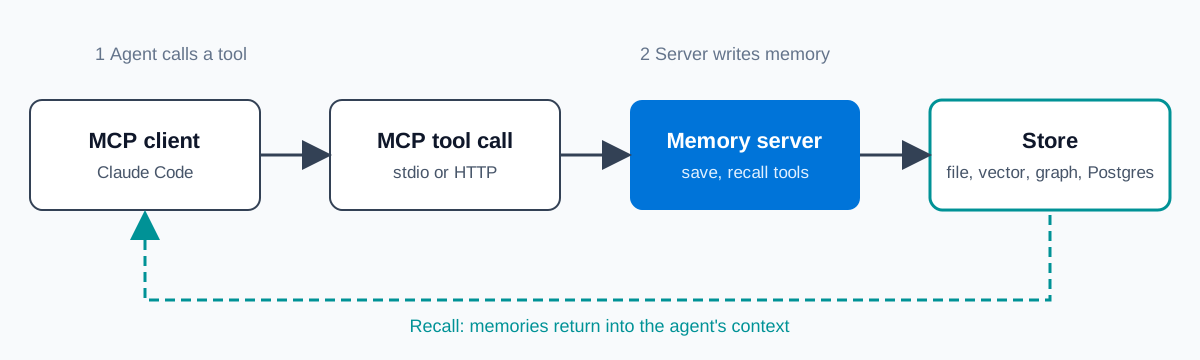
In practice the flow has four steps. The MCP client (Claude Code, Codex, OpenCode or OpenClaw) calls a tool on the server, over stdio or HTTP, as the MCP specification defines. The server writes the memory to a store. That store can be a file, a vector index, a graph or a Postgres database. Later, when the agent calls a recall or search tool, the server returns matching memories into the agent's context.
Most servers stop there. They store what the agent saved and fetch what matches. Some go one step further. They review what happened and change what they return next time. Hindsight's reflect tool is our example. Its doc describes it as generating analysis by "synthesizing stored memories with the bank's personality". It can scope that analysis to tagged memories, and it defaults to a low budget.
That difference is the one the rest of this page keeps coming back to. A store that only fetches will return the command Maya ran on Monday. A system that also reviews outcomes has a chance to return the fact that the command failed.
Memory MCP servers compared
We ranked the six servers on six stated points: storage, hosting, license, MCP transport and tools, install, and whether the server only stores facts or also learns from outcomes. We did not rank on stars or downloads. A cell that says "not stated in its docs" means the source we read does not say. Prices are as of November 2026.
| Server | Storage | Hosting | License | MCP transport | MCP tools | Learns from outcomes | Source |
|---|---|---|---|---|---|---|---|
| Hindsight | Postgres with pgvector | Local (open source), Hindsight Cloud | MIT | HTTP | 27 (one bank) or 30 (many banks) | Yes: reflect tool | repository |
| Reference Knowledge Graph Memory Server | JSONL file | Local | MIT (memory server README) | stdio | 9 | No outcome tool in its 9 | README |
| Mem0 MCP | Mem0 service (library mode: local Qdrant and SQLite) | Hosted MCP server; self-hosted library | Apache 2.0 (library) | HTTP | 11 | No outcome tool in its 11 | docs |
| Supermemory MCP | Vector, full-text and graph indexes | Hosted MCP server | MIT (repository) | not stated in its docs | 9 visible to the model | No outcome tool in its 9 | docs |
| Graphiti MCP server | FalkorDB (default) or Neo4j 5.26+ | Self-hosted only | Apache-2.0 | HTTP (default), stdio | 13 | No outcome tool in its 13 | README |
| Basic Memory | Markdown files and a local SQLite index | Local free; Cloud from $19 a month | AGPL-3.0 | stdio, https | 16 local tools listed | No outcome tool in its list | repository |
Storage decides what you run. Hindsight needs a Postgres database. Graphiti needs a graph database and, by its README, an LLM provider key. The reference server and Basic Memory need only files on disk. If you want zero infrastructure, files win. If you want search that goes beyond text matching, a database starts to matter.
Hosting decides where your memory lives. Mem0's docs say its MCP server is hosted by Mem0 and connects over HTTPS, so memories sit on Mem0's service. Graphiti's README lists it as self-hosted only. Hindsight runs either way: open source on your machine, or Hindsight Cloud. Pick hosted when a team shares memory and nobody wants to run a server.
License matters most if you ship the server inside a product. Most of these are MIT or Apache. Basic Memory uses AGPL-3.0, which has network-use terms, so read its licence file before you decide.
Learning from outcomes is where Hindsight differs. The other five lists show tools to save, search and delete. Hindsight adds reflect. That column is based on each server's published tool list, not on a test.
View Hindsight on GitHub and read the MCP server code yourself.
The six memory MCP servers, one by one
Hindsight MCP server
Hindsight is an open source (MIT) agent memory system that runs on Postgres with pgvector. You can run it yourself, use Hindsight Cloud for a managed service, or use Hindsight Enterprise in a private cloud, BYOC or on premises. Its tagline is "Agent memory that learns", and the MCP server is how a coding agent reaches it.
The MCP server is on by default, at /mcp on the API server. Set HINDSIGHT_API_MCP_ENABLED to false to turn it off. There are two endpoints. The single-bank endpoint, /mcp/{bank_id}/, exposes 27 tools and sets the bank from the URL. The multi-bank endpoint, /mcp/, exposes 30 tools. It adds list_banks, create_bank and get_bank_stats, and each tool takes an optional bank_id. A bank is one memory store. Give each project or each team its own.
The core tools are three. retain saves a memory and runs asynchronously. A sibling, sync_retain, blocks until the memory is queryable. recall fetches memories. reflect synthesizes the stored memories into an analysis. Beyond those, the server has mental model tools, directive tools and page tools. That is why the tool count is high. A model has more choices here than in a server with nine tools, which is a real cost.
Authentication is off by default. To require a key, set HINDSIGHT_API_TENANT_EXTENSION to the built-in API key tenant extension and HINDSIGHT_API_TENANT_API_KEY to your secret. Clients then send it as a Bearer token. Without a key, anyone who reaches the port can read and write memory, so turn it on before you expose the server beyond your machine.
The bank is chosen in this order: the URL path, then the X-Bank-Id header, then the HINDSIGHT_MCP_BANK_ID environment variable, which defaults to "default". Hindsight also runs as a memory provider for Hermes Agent. Our comparison of Hermes Agent memory providers shows how that looks next to the others.
Who it fits: a developer or team that wants the agent to get better from what happened, not only to remember it, and that can run Postgres or use Hindsight Cloud.
Reference Knowledge Graph Memory Server
The reference server is a basic implementation of persistent memory using a local knowledge graph, published in the Model Context Protocol servers repository. It stores memory in a JSONL file, memory.jsonl by default, and serves 9 tools over stdio. Its memory server README states the MIT licence.
Its README says writes are atomic: each write goes to a temporary file that is renamed over the memory file.
One limit comes from the README. Under npx, the default file sits inside node_modules, and updates can delete it. Set MEMORY_FILE_PATH to avoid that. The repository README also says its servers are educational examples, "not as production-ready solutions". Its search_nodes tool matches text across entity names, types and observations, and the README names no embeddings.
Who it fits: a developer who wants a local example of MCP memory or a base for a server of their own.
Mem0 MCP
Mem0 describes itself as "The Memory Layer for AI Agents". Its docs offer a managed Platform and an open source library. The MCP server the docs now describe is hosted at https://mcp.mem0.ai/mcp, connects over HTTP, and has 11 tools, from add_memory to delete_all_memories. See our pages on Mem0 alternatives and Hindsight vs Mem0 for more.
In library mode the defaults are a local Qdrant store, an OpenAI model and a SQLite history file. The library uses the Apache 2.0 licence. Mem0's pricing page lists a free plan at $0, with limits, as of November 2026.
The limit: the hosted MCP server needs a Mem0 account, so memories live on Mem0's service. The docs describe no local MCP server for the open source library.
Who it fits: developers who want a hosted memory API and an MCP endpoint they reach over HTTPS.
Supermemory MCP
Supermemory's docs call it "context infrastructure for AI agents". Its engine keeps vector, full-text and graph indexes. The hosted MCP server is at https://mcp.supermemory.ai/mcp and lists 9 tools visible to the model, including search_memory, add_memory and get_profile. Our pages on Supermemory alternatives and Hindsight vs Supermemory go deeper.
The repository carries the MIT licence. Its docs say the MCP server uses OAuth, "so no API key is required".
Two limits come from its own docs. A memory can lag the write: in the default "dynamic" mode, memories can appear after a document shows "done", and the README says "done" does not mean memories are searchable yet. The docs also do not say which plan includes the hosted MCP server, or whether it works with the local install.
Who it fits: a reader who wants a hosted server with browser sign-in and no API key.
Graphiti MCP server
Graphiti is "a framework for building and querying temporal context graphs for AI agents", from the Zep team. Its MCP server lives in the mcp_server folder of the repository and has 13 tools, such as add_memory, search_nodes and search_memory_facts. Keep Graphiti and Zep apart: Graphiti is the open source library, and Zep is the managed product built on it.
Storage is FalkorDB by default or Neo4j 5.26 or later. The server defaults to HTTP, with stdio as an option. The license is Apache-2.0. Run docker compose up in the mcp_server folder to start FalkorDB and the server at http://localhost:8000/mcp/.
The limits are in its README. Adding memory calls an LLM, and the README says Graphiti defaults to OpenAI, so you need a provider key. It labels the MCP server experimental, says "Do not use the server as a production deployment", and says it has no authentication.
Who it fits: a developer who already runs a graph database and an LLM provider and wants to build temporal graph memory with code.
Basic Memory
Basic Memory's repository says "AI conversations that actually remember". It stores memory as Markdown files in ~/basic-memory, with a local SQLite index. Its README says "No servers required", and you can open the folder in Obsidian. It uses AGPL-3.0.
The README lists 16 local tools in groups: content, search and discovery, knowledge graph, projects, schema and a manual. Local use is free. Cloud starts at $19 a month, as of November 2026, with a 7-day trial.
The limit: the open issue #382 in its tracker is titled "Optimize memory usage for large file syncs (PDFs, images, etc.)". Its docs do not say whether the SQLite index holds embeddings.
Who it fits: a person who wants notes as Markdown files on their own disk and accepts a file-and-SQLite store.
How to choose a memory MCP server
Three questions settle most cases.
Local or hosted? If memory holds private code, or you work offline, go local: Hindsight open source, the reference server, Graphiti or Basic Memory. If several people share it and nobody wants to run a server, go hosted: Hindsight Cloud, Mem0 or Supermemory.
Graph, vector or files? Files are the simplest and the easiest to read. A graph database suits memory built around entities and time. A vector index suits fuzzy recall. Hindsight keeps vectors in Postgres, so you run one database.
Store facts or learn from outcomes? If you need the agent to remember a rule, any of the six will do. If you need it to remember that a fix worked and an older fix did not, you need a system that reviews outcomes.
Here is a case. A four-person platform team gives each developer a local file-based memory server. One agent learns that a deploy script needs a flag. The other three agents never see it, and each of them hits the same error that week. The team then points all four agents at one shared server with one bank. The fix reaches everyone on the next session. (This is an illustration, not a real team.)
Which server fits which reader:
- Hindsight: you want an agent that improves, and you can run Postgres or use Hindsight Cloud.
- Reference server: you want a local example to learn from or build on.
- Mem0 MCP: you want a hosted memory API over HTTPS.
- Supermemory MCP: you want hosted memory with browser sign-in.
- Graphiti MCP server: you already run a graph database and an LLM provider.
- Basic Memory: you want Markdown notes on your own disk.
How to add a memory MCP server to Claude Code
Start with Hindsight. This command comes from the Hindsight MCP doc, and the key and bank ID are placeholders you replace:
claude mcp add --transport http hindsight http://localhost:8888/mcp \
  --header "Authorization: Bearer your-secret-key" \
  --header "X-Bank-Id: my-bank"
The others, each from its own docs:
- Mem0:
npx mcp-add --name mem0-mcp --type http --url "https://mcp.mem0.ai/mcp" --clients "claude code". It needs a Mem0 account for sign-in. - Basic Memory:
claude mcp add basic-memory -- uvx --prerelease=allow basic-memory mcp. - Graphiti: run
docker compose upinmcp_server, then point your client athttp://localhost:8000/mcp/. Its README gives a generic HTTP config with"transport": "http". - Supermemory: its docs give a JSON config with
"url": "https://mcp.supermemory.ai/mcp". - Reference server: its README gives a Claude Desktop config with
npx -y @modelcontextprotocol/server-memory, and no Claude Code line.
Consider a developer who adds two memory servers at once. The agent saves the same fact in both, then recalls a different version from each. The fix is one memory server per agent, or clear tool names. (This is an illustration, not something we saw happen.)
Two mistakes to avoid. First, no auth on a server that listens on a network port. Hindsight is open by default, and Graphiti's README says it has no authentication. Second, a bank ID that differs between machines, so the same agent reads from a different store at home and at work.
Next steps: pick a memory MCP server
Here is what to do, in order.
- Answer the three questions: local or hosted, graph, vector or files, store or learn.
- Install one memory MCP server from the commands above.
- Turn on auth before the port leaves your machine.
- Run a week of real sessions.
- Check what the agent recalls, and whether it repeats old mistakes.
If you work with OpenClaw, see OpenClaw memory with Hindsight, Supermemory and Mem0.
Try Hindsight Cloud to skip the setup. If you'd rather start without an account, the open source version runs locally on Postgres under the MIT licence, so trying it costs you an afternoon.
Frequently Asked Questions
What is a memory MCP server?
A memory MCP server is a program that gives an AI agent tools to save and fetch memory over the Model Context Protocol. The agent calls tools such as retain or add_memory to write, and recall or search tools to read. The server keeps the data in a file, a database or a graph, so it survives between sessions.
Which memory MCP server works with Claude Code?
Hindsight, Mem0 and Basic Memory document a command for Claude Code. Supermemory and Graphiti document a JSON config with a URL. The reference server's README shows a Claude Desktop config, not a Claude Code line. Check each doc against your client version before you rely on it.
What is the difference between a knowledge graph memory MCP and a vector memory MCP?
A knowledge graph server stores entities and the relations between them, and search follows those links. A vector server stores text as embeddings and returns the closest matches. Graphiti and the reference server use graphs. Supermemory combines vector, full-text and graph indexes. Hindsight keeps vectors in Postgres with pgvector.
Should I run a memory MCP server locally or use a hosted one?
Run it locally when memory holds private code or you work offline. Use a hosted server when several people or machines need one shared memory. Mem0's hosted server keeps memories on Mem0's service and needs an account. A local server like Basic Memory keeps files on your own disk.
Can I run more than one memory MCP server at the same time?
You can, but the agent then sees two sets of save and recall tools. It may save a fact to both and recall different versions. Use one memory server per agent, or give each server clear tool names, so the agent knows where each fact lives.