Graphiti Review: How It Works, Setup and Limits
Graphiti's own MCP server README tells you what not to do with it: "Do not use the server as a production deployment." I'd read that line before you build a memory layer on top of it.
If you've come across Graphiti (32.9k GitHub stars as of November 2026) or Zep, a temporal knowledge graph probably sounds like the right shape for AI agent memory. Facts carry dates. Old facts get retired, not erased. The idea has a clear use, and I'll show you where it holds.
This Graphiti review covers what Graphiti stores, what you have to run to use it, how to set up its MCP server, and where it stops. The short answer to "what is Graphiti": it's Zep's open-source (Apache-2.0) Python framework for temporal knowledge graphs, and it's the graph layer inside Zep. It fits a team that already runs a graph database and wants to write its own memory layer in Python. It's a heavy stack for a team that wants agent memory running today.
I build Hindsight, so I have a stake in this. I read Graphiti's README, its MCP server README and its issue tracker in November 2026, and every limit below carries its source. If you're still choosing a system, start with agent memory systems compared. The page runs in six parts:
- What Graphiti is and how it relates to Zep
- How Graphiti stores and updates memory
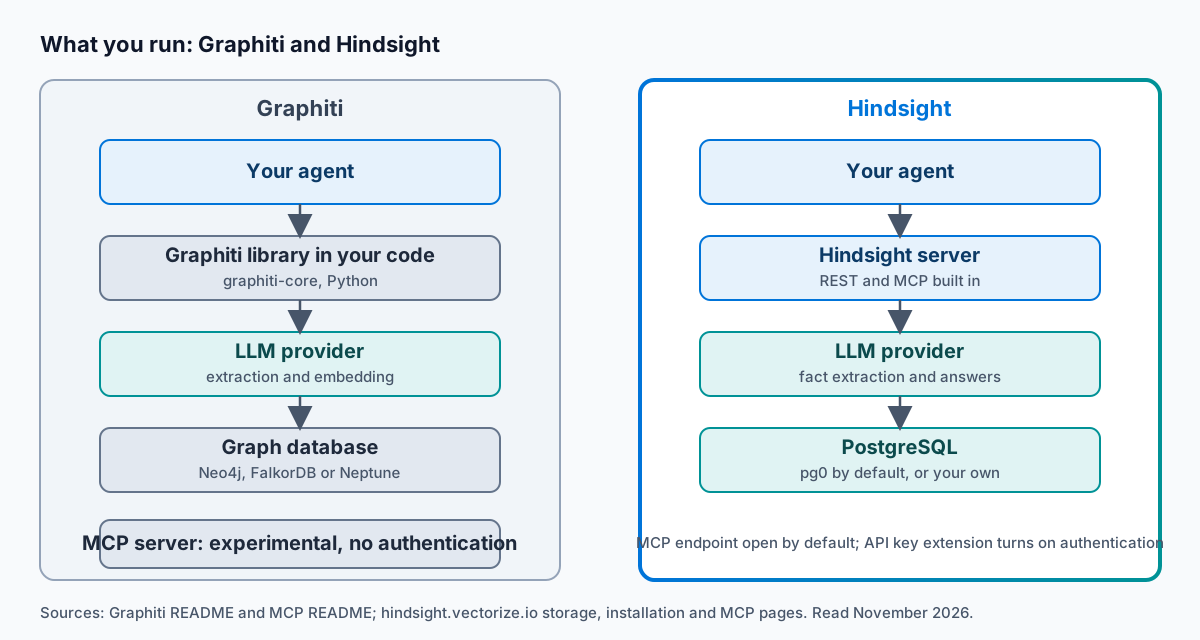
- What Graphiti needs to run
- How to set up the Graphiti MCP server
- Where Graphiti stops
- Graphiti or Hindsight, and what to do next
Picture Marco. He wires the Graphiti MCP server into Cursor on a Friday afternoon with docker compose up, and it works on the first try. On Monday his security lead asks who can reach port 8000. The README's answer is blunt: "The server has no authentication, no authorization, and no prompt-injection protection." Marco puts the server behind a gateway before anyone else on the team connects to it. Nothing was wrong with his Friday. He ran a reference server as if it were a service.
What is Graphiti, and how does it relate to Zep?
Graphiti is the library. Zep is the managed product. The Graphiti README says so directly: "Graphiti is the graph construction framework inside Zep." The Zep docs add that "Zep uses Graphiti to derive temporal graph artifacts." If you're weighing Zep alternatives, Graphiti is the part of Zep you can run yourself.
If you want to see what agent memory looks like on one Postgres database, read how Hindsight stores memory.
The README's own comparison table lists its own deployment as "Self-hosted only", while Zep is "Fully managed or in your cloud (BYOC)". That matters for what you take on. With Graphiti, you run the database, you pay for the LLM calls, and you run the server. Nobody does those three jobs for you, and each one has an owner on your team: whoever runs the database, whoever holds the LLM budget, and whoever secures the server.
The licence is Apache-2.0, and the repository sits at 3.4k forks as of November 2026. You install the library with pip install graphiti-core or uv add graphiti-core. The newest release on PyPI is graphiti-core 0.31.2, uploaded on October 20, 2026.
One name collision: "Graphiti" also names Eclipse Graphiti, a diagram editor. This page covers Zep's framework.
How Graphiti stores and updates memory
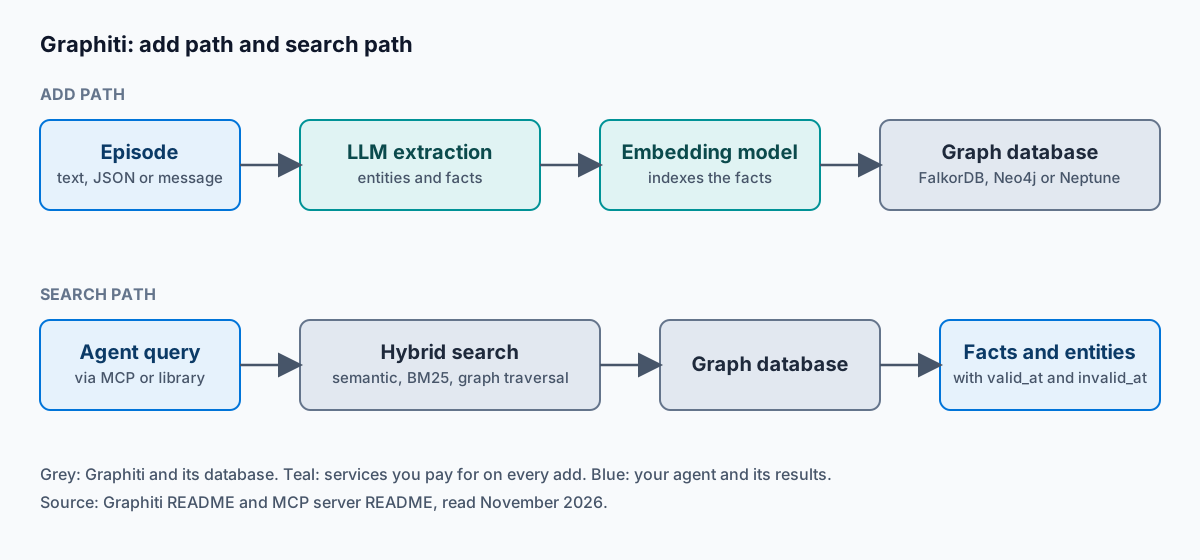
Start with the simple version. It keeps three kinds of things in a graph. The README calls them Episodes (provenance), Entities (nodes) and Facts / Relationships (edges) "with temporal validity windows". An episode is the raw data as you ingested it. Every derived fact traces back to one.
Now the part that makes it a temporal graph. The README states "Explicit bi-temporal tracking with automatic fact invalidation". The MCP server exposes this: add_memory takes a reference_time, and search_memory_facts takes valid_at and invalid_at filters.
Here's how I'd explain it to a friend. Think of a spreadsheet of facts with a "from" column and an "until" column. Say Priya tells your agent she lives in Austin, and a year later that she's moved to Denver. It doesn't overwrite the Austin row. It fills in the "until" date and adds a Denver row. In the README's words: "When information changes, old facts are invalidated — not deleted." You can ask what's true now, or what was true at any point in time. That's the one design choice in this review that I'll state as a plain fact, with no comment.
Here's the cost side. Adding an episode calls an LLM to extract entities and facts, and an embedding model to index them. So every write costs LLM calls. If your agent writes memory on every turn, you pay for that on every turn. The one exception in the MCP server is add_triplet, which adds a single fact "directly, bypassing extraction". You then write the entities and the fact yourself, and you give up the extraction that makes the graph build itself.
Search is a mix. The README says it "Combines semantic embeddings, keyword (BM25), and graph traversal". The README says this is "for low-latency, high-precision queries without reliance on LLM summarization". It doesn't say whether a search itself calls an LLM, so check your own traces before you budget for it. If you want to try the two modes side by side, search_nodes finds entities and search_memory_facts finds the facts between them.
What Graphiti needs to run
This is the section most Graphiti pages skip. Here's what you stand up.
A graph database. The README's requirement line reads: "Neo4j 5.26 / FalkorDB 1.1.2 / Amazon Neptune Database Cluster or Neptune Analytics Graph + Amazon OpenSearch Serverless collection". PyPI lists Kuzu 0.11.2 and marks it deprecated. Postgres isn't on the list.
An LLM provider. It defaults to OpenAI for inference and embedding, and the README tells you to use a provider that supports Structured Output, such as OpenAI, Anthropic or Gemini. Other services "may result in incorrect output schemas and ingestion failures", and the README says that's especially a problem with smaller models.
A concurrency limit. The default is a rate-limit guard, not a speed setting. "By default, SEMAPHORE_LIMIT is set to 10 concurrent operations to help prevent 429 rate limit errors from your LLM provider." You raise it if ingestion is slow, and you take the 429 risk when you do.
Python 3.10 or later for the MCP server. The MCP README also lists Docker and Docker Compose for the default FalkorDB setup, and an MCP-compatible client.
Here's the whole list in one table.
| Part | What it is | Value |
|---|---|---|
| Library | Python package | graphiti-core 0.31.2, Apache-2.0 |
| Graph database | Stores episodes, entities and facts | Neo4j 5.26, FalkorDB 1.1.2, or Amazon Neptune with OpenSearch Serverless |
| LLM provider | Extracts entities and facts on every add | OpenAI by default; Anthropic, Gemini and Groq supported |
| Embedding model | Indexes facts for semantic search | OpenAI by default |
| MCP server | Reference server in the mcp_server folder | 13 tools, labelled experimental |
| Transport | How clients connect | HTTP at /mcp/ by default, stdio optional |
| Authentication | Who can call the server | None |
| Licence | Terms of use | Apache-2.0 |
Say you're Dana. Your team runs Postgres and nothing else. To try it, she has to stand up FalkorDB or Neo4j 5.26, get an OpenAI key, and keep SEMAPHORE_LIMIT at 10 so the provider doesn't return 429 errors. A one-afternoon test turns into a new database for the platform team to own.
How to set up the Graphiti MCP server
The steps below come from the MCP server README. I've kept to what it says.
- Clone the repository. Run
git clone https://github.com/getzep/graphiti.git, thencd graphiti/mcp_server. - Set the LLM key. Put your provider key in the
.envfile. Check that the container receives it. Issue #2113, opened November 2, 2026, is titled "[Bug] MCP docker compose files don't forward provider API keys to the container". - Start the server. Run
docker compose up. It starts FalkorDB and the MCP server together. The endpoint ishttp://localhost:8000/mcp/and the health check ishttp://localhost:8000/health. If you'd rather use Neo4j, the README's alternative runs separate containers for Neo4j and the server, and you setNEO4J_URI,NEO4J_USERandNEO4J_PASSWORD. Plan for the extra container and the extra credentials. - Connect your client. The README's HTTP config is:
{
  "mcpServers": {
    "graphiti-memory": {
      "transport": "http",
      "url": "http://localhost:8000/mcp/"
    }
  }
}
- Use a gateway for Claude Desktop. The README says Claude Desktop "does not natively support HTTP transport, so you'll need to use a gateway like
mcp-remote."
The README gives no claude mcp add line for Graphiti, so I won't invent one. Any MCP client that speaks HTTP can connect to the endpoint above. The default transport is HTTP, and stdio is optional.
The server exposes 13 tools: add_memory, add_triplet, search_nodes, search_memory_facts, summarize_saga, build_communities, get_episode_entities, delete_entity_edge, delete_episode, get_entity_edge, get_episodes, clear_graph and get_status. Without Docker, run uv sync, then uv run main.py. For Neo4j, run uv run main.py --database-provider neo4j.
Three mistakes to avoid:
- A missing provider key in the container. Without it, the container has no key to call your LLM provider with.
- A
group_idthat differs between writes and reads. On FalkorDB eachgroup_idlives in its own graph, so reads, deletes and clears need the samegroup_idthat the writes used. - Exposing port 8000 beyond localhost. The README says you'd have to pass
--host 0.0.0.0or change the port mapping to do it, and the server has no authentication.
If you're comparing options before you commit, see memory MCP servers compared.
Where Graphiti stops
Every limit here comes from its own repository.
The MCP server is a reference server. The MCP README opens with "This is an experimental Model Context Protocol (MCP) server implementation for Graphiti." I quoted its production warning and its authentication line above, so I won't repeat them. The README adds one more: "Do not expose the server to an untrusted network." The main README says the same about the reference MCP and REST servers, and says "The example Docker Compose files use default database credentials."
Authentication is out of scope. The main README says security reports about these limits are out of scope. It says pull requests that add authentication, authorization or prompt-injection filters to the reference servers are out of scope too. So nobody is going to ship those in the reference server for you.
Structured output decides whether ingestion works. A provider without it can produce "incorrect output schemas and ingestion failures". The MCP README says small or local models can return JSON that fails extraction.
LLM errors show up in the open tracker. Issue #2180, opened November 19, 2026, is titled "[Bug] LLM clients resend requests the provider rejected (400/401/403/404/422), with a longer prompt each time". Each retry resends a longer prompt, so the failure compounds on the request that failed.
Kuzu is deprecated. If you picked it as the embedded option, you'll move to Neo4j or FalkorDB.
Add it up. You build the production layer yourself: authentication, a gateway, database operations and an LLM budget. None of those four jobs is exotic, and each one needs an owner before the server serves anyone but you. That job is real work for a platform group, and it's a lot for a developer who wanted agents to remember things this week.
Graphiti or Hindsight: which fits your agent?
I built Hindsight to take a different route, so here's the contrast on the three points that matter.
| Graphiti | Hindsight | |
|---|---|---|
| What you run | Library, graph database, LLM provider, MCP server | One server on Postgres, with REST and MCP built in |
| Database | Neo4j, FalkorDB or Neptune | PostgreSQL (embedded pg0 by default) |
| LLM key | Needed for extraction and embedding | Needed for fact extraction, entity resolution and answers |
| MCP authentication | None | Open by default; API key extension turns it on |
| A fact changes | Old edge invalidated | Observation updated, history kept |
| Licence | Apache-2.0 | MIT |
What you run. Graphiti is a library, plus a graph database, plus an MCP server you secure yourself. Hindsight is one server. It "uses PostgreSQL as its primary storage backend", and graph queries run in Postgres as recursive CTEs, so there's no second database. For local work the default is pg0, "an embedded PostgreSQL that runs locally on your machine". The MCP server "is enabled by default and mounted at /mcp on the API server".
Both products call an LLM when they store memory. Hindsight's installation page says: "You need an LLM API key for fact extraction, entity resolution, and answer generation." I'm not going to tell you Hindsight skips that cost.
Authentication is the same kind of honesty. Hindsight's MCP endpoint is open by default too. You turn on the API key tenant extension, and then a missing or invalid key gets "401 Unauthorized". The difference is that the MCP page documents that switch for the server you run.
How a changed fact is handled. The old edge gets invalidated. Hindsight records the new fact and updates the observation, which is "a belief consolidated from many facts, with its evidence and its history". Retain consolidates observations "automatically in the background". Then the agent recalls the belief, not only the fact. Recall "runs four searches in parallel", and Hindsight tracks when an event happened and when you told it. That's what I mean when I say memory isn't only a store of facts. Agents make mistakes, and yours should learn from them.
Picture Tomás. He runs a support agent on Postgres. A customer moves from the Pro plan to the Team plan. Hindsight retains the new fact, the observation about the customer's plan updates in the background, and its history keeps the Pro period. The next session recalls the current plan, and the agent stops offering a Pro upgrade to a Team customer.
Who each one fits. Hindsight fits a team that runs Postgres and wants memory that improves over time in its agents now. Graphiti fits a team that already runs Neo4j or FalkorDB and wants to build the memory layer in Python code. On the benchmark side, Hindsight scores 94.6% on LongMemEval-S (Hindsight v0.4.19, Agent Memory Benchmark, single-query mode), as of March 2026. See the Hindsight benchmarks for how we run it. For the Zep side of the same choice, read Hindsight vs Zep.
Run Hindsight on your own Postgres: View on GitHub. Or start with a managed Hindsight bank on Hindsight Cloud.
What to do next
Three takeaways if you stay with Graphiti:
- Keep the Graphiti MCP server on localhost.
- Budget LLM calls on every write.
- Pick a graph database your team already runs.
If you'd rather try Hindsight, the next steps in order are these. Run Hindsight with the command from the installation page:
export OPENAI_API_KEY=sk-xxx

docker run -it --pull always --name hindsight --restart unless-stopped --shm-size=1g --stop-timeout 75 \
  -p 8888:8888 -p 9999:9999 \
  -e HINDSIGHT_API_LLM_API_KEY=$OPENAI_API_KEY \
  -v hindsight-data:/home/hindsight/.pg0 \
  ghcr.io/vectorize-io/hindsight:latest
Then connect Claude Code with the line from the MCP page:
claude mcp add --transport http hindsight http://localhost:8888/mcp \
  --header "Authorization: Bearer your-secret-key" \
  --header "X-Bank-Id: my-bank"
The Authorization header applies once you turn authentication on, and X-Bank-Id picks the memory bank. Retain one session, then recall it the next day.
There's little to lose by trying it: Hindsight runs on the Postgres you already have, and the code is MIT on GitHub. Start on Hindsight Cloud if you don't want to run anything, or self-host under the MIT licence.
Frequently Asked Questions
How does Graphiti differ from RAG? RAG retrieves chunks of documents that match a query. Graphiti extracts entities and facts from episodes into a graph, and each fact has a time window. So it answers "what was true then" as well as "what's relevant". See agent memory and RAG for the wider split.
Does Graphiti support Postgres? No. The README lists Neo4j 5.26, FalkorDB 1.1.2 and Amazon Neptune with OpenSearch Serverless, and PyPI lists Kuzu 0.11.2 as deprecated. Postgres isn't on the list. Hindsight is the Postgres option: it uses PostgreSQL as its primary storage backend and needs no second database.
What does group_id do in Graphiti?
It separates sets of related data. On FalkorDB, each group_id is stored in its own graph. Reads, deletes and clears need the same group_id that the writes used.
Is Graphiti still maintained? Graphiti released graphiti-core 0.31.2 on PyPI on October 20, 2026. As of November 20, 2026, the repository has 263 open issues, and the last push was November 19, 2026. Issues opened in November 2026 include #2113, #2124, #2139 and #2180.
How do I turn off Graphiti telemetry?
Anonymous telemetry is on by default. Set the environment variable GRAPHITI_TELEMETRY_ENABLED=false, in your shell or in the .env file for the MCP server. Both the main README and the MCP README give this setting, and the MCP README adds that you can put it in your .env file.