Supermemory Review: How It Works, Pricing and Limits
Sam adds Supermemory to an OpenClaw agent, saves the line "deploy to staging first", and asks for it back one minute later. The document shows done. The memory isn't there yet.
That isn't a bug in Sam's setup. It's how the product is documented to work. This Supermemory review covers what that behaviour means and a lot more. Supermemory is a memory and context engine for AI agents. Its core product is closed source, and its repository holds MIT-licensed basic capabilities and developer tooling. (Sam is an illustration, not a customer.)
You've probably seen the vendor page and the README. Those say what the product promises. We read the docs, the repository, the pricing page and the benchmark page in November 2026, and we link each claim. One disclosure first: we build Hindsight, a competing agent memory system. We haven't run Supermemory in production.
Our verdict, in one paragraph. Supermemory turns documents into chunks, memories and a user profile, and serves them by search. Hindsight turns what happened into typed facts and observations that update when new evidence arrives, and reasons over them with reflect. You can try it from the Hindsight installation guide. For an agent that must keep its beliefs current and learn from its mistakes, we recommend Hindsight. Both fit the wider idea of AI agent memory.
Next: how Supermemory stores memory, whether it's open source, what it costs, what its benchmark numbers measure, where it differs from Hindsight, and a checklist you can run.
What Is Supermemory and How Does It Store Memory?
Start with the simple picture. You give Supermemory something to remember. It breaks that input down, indexes it, and lets you search it later.
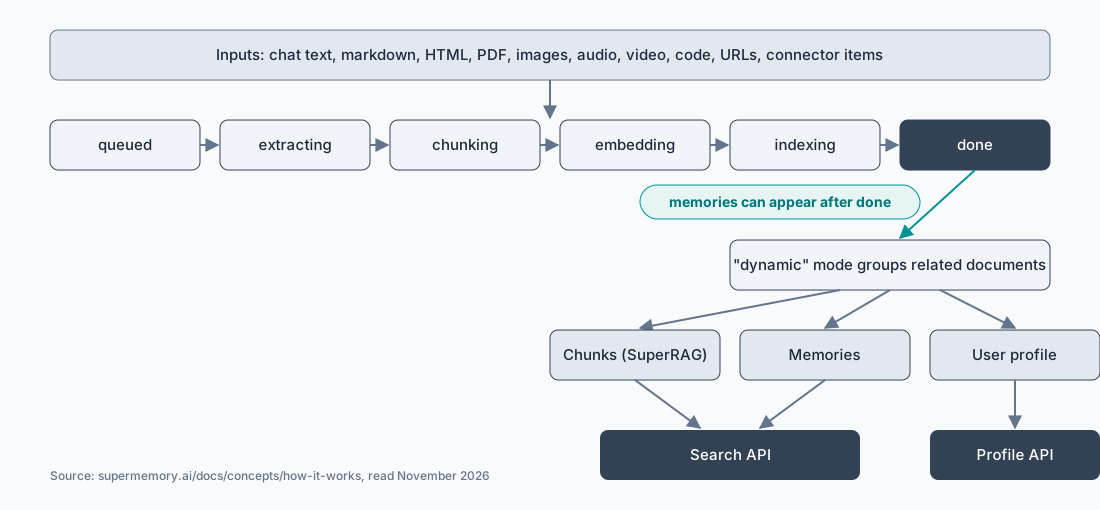
The input can be chat text, markdown, HTML, PDF, images, audio, video, code, URLs and items from connectors. Each document moves through these stages: queued, extracting, chunking, embedding, indexing, done. Storage is a temporal vector-graph engine with vector, full-text and graph indexes, according to the how-it-works page linked above.
Now go one level deeper. A finished document produces three outputs:
- Chunks. Pieces of the source text, indexed for search. The docs call this SuperRAG.
- Memories. Facts extracted from the documents, held in a graph.
- A user profile. A static summary and a dynamic summary.
Think of a filing cabinet and a notebook. Chunks are the photocopies in the cabinet: the original wording, found by similarity. Memories are the notes you wrote about them: shorter, linked, and meant to answer "what do we know about this user?" The distinction matters for agent memory and RAG, because a chunk store alone only gives you retrieval.
Memories don't form at the moment of writing. The default mode, "dynamic", groups related documents so memories form from coherent units. The docs state that memory extraction may continue after the status reads done. The "instant" mode processes one document on its own and bills one extra operation per document. So Sam's missing memory is the documented dynamic mode at work.
Why does the lag exist? A graph of memories gets better when the system sees related documents together. Reading one note alone tells you little about how it fits what you already know. Grouping buys better memories and costs time. That is a fair trade for a document library. It is a harder trade for an agent that must act on a preference seconds after it hears it, and you should decide which case yours is before you build on it.
You read results back through a Search API, a Profile API and metadata filters. Isolation uses namespaces and scoped API keys. The docs page doesn't state file size limits, how search results are ranked, or how the graph resolves conflicting facts.
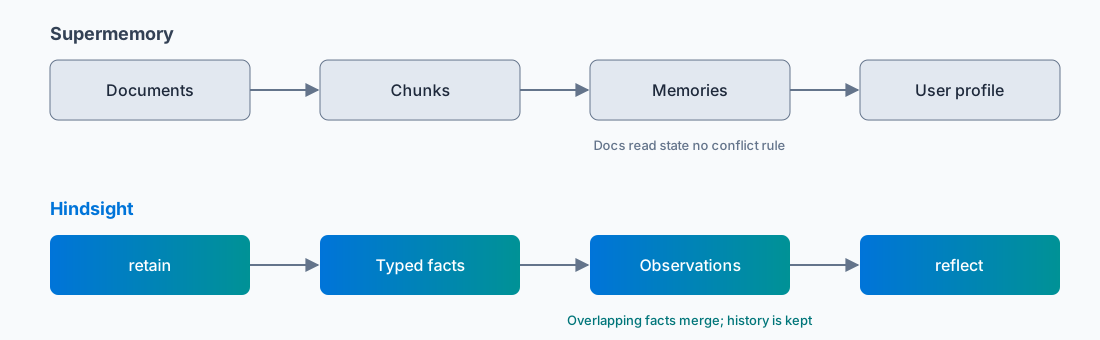
For comparison, Hindsight stores facts with types and merges overlapping ones. For the wider field, see our agent memory systems overview.
Is Supermemory Open Source? Setup and Self-Hosting
Only in part. Supermemory's core product is closed source, and the repository holds MIT-licensed basic capabilities and developer tooling. The README says the MCP server and the plugins are open source.
The README gives two ways to start a local install:
curl -fsSL https://supermemory.ai/install | bash
# or
npx supermemory local
Source: the Supermemory README, linked above. The full Memory API then runs at http://localhost:6767, and the README says everything lives in ~/.supermemory. Docker images exist for linux amd64 and arm64.
The local install lets you pick a model provider: OpenAI, Anthropic, Gemini, Groq or any OpenAI-compatible endpoint. Embeddings run locally by default, with no API key. Two limits come from the same README. URL ingestion uses a hosted reader service, so it doesn't run offline. Local text and file inputs work offline only after the first embedding-model download.
One source difference deserves a flag. The README offers a free local install. The pricing page lists a "self-hosted option" under the Scale plan and air-gapped self-hosting under Enterprise. Each source says what it says. Neither page explains how the two relate, so ask the vendor before you plan around either one.
A practical note on the local install: all state sits in one folder, ~/.supermemory. That makes backups simple, and it also means you own them. Copy the folder before you upgrade, and keep it out of any directory a sync tool or cleanup job touches. Hindsight users face the same duty with their Postgres volume.
For the Hindsight side: it is open source under the MIT licence and runs on PostgreSQL 14 or later with a vector extension. The installation page gives a Docker command, pip packages and a Helm chart. The shortest start is:
pip install hindsight-all
Source: the Hindsight installation docs, linked above. For production, the docs say to use an external PostgreSQL instead of the embedded default.
Supermemory Pricing as of November 2026
Supermemory prices in credits. Here are the plans as of November 2026, read from the vendor's pricing page.
| Plan | Price | Monthly credits | What the plan adds |
|---|---|---|---|
| Free | $0 | $5 | All plugins, search and memory API, 1 team seat |
| Pro | $19 a month | $20 | Auto top-up, 3 team seats |
| Max | $100 a month | $130 | Gmail connector |
| Scale | $399 a month | $600 | Advanced PDF extraction, S3 and web crawler connectors, SOC 2, HIPAA BAA, a self-hosted option |
| Enterprise | Custom | Not stated | Custom integrations, SSO, air-gapped self-hosting, SLA |
Credits are usage meters. The pricing page says real usage mixes meters, and it states no storage limits. Instant mode adds one billed operation per document, so an ingestion-heavy agent should test its own cost before it commits to a plan. The page shows no date, so prices may change.
How should you read this table? Start with the free plan and a real workload. Count the documents your agent writes in a day, multiply by the operations each one needs, and compare the total with the monthly credits. Do this before you pick Pro or Max, because the meters mix and the page gives no per-operation prices in the table above.
Hindsight's open-source version is free to self-host. Hindsight Cloud is the managed option, and you can see its plans when you sign up for Hindsight Cloud.
Supermemory Benchmark Claims and Controversy
Benchmark numbers are where memory products get compared, and where readers get misled. Supermemory's LongMemEval headline shows why you read the metric before the figure.
LongMemEval is an end-to-end question-answering benchmark. A memory system ingests long chat histories, then answers the 500 questions of the LongMemEval-S set. An LLM judge marks each answer right or wrong, and the official repository scores the run with its evaluate_qa.py script and a GPT-4o judge. The repository has a retrieval-recall check too, but as a separate evaluation. The number systems are compared on is answer accuracy.
Supermemory's benchmark page, linked above, leads with "97% Overall Recall@20". The page says the retrieval configuration is "Recall@20 with aggregation" and that gpt-4o judges the answers. It doesn't say what the aggregation step does. Recall@20 asks whether the right evidence showed up anywhere in the top 20 results. That's a retrieval question, not the answer-accuracy question LongMemEval is scored on.
The figure also changed. Supermemory's earlier technical report gave 81.6% answer accuracy for its GPT-4o run on LongMemEval-S, and our Hindsight paper cites that number. The current page shows 97% for the same model on the same dataset, under the new "Recall@20 with aggregation" configuration. The page doesn't explain the jump. On the same page, Supermemory's GPT-5 and Gemini-3 Pro runs score 84.6% and 85.2%.
Two more points make the 97% hard to check. Wavect, an independent writer, notes that the figures are vendor-reported and that recall measures retrieval, not end-to-end answers. And a user issue on the Supermemory repository reports that the benchmark code isn't open source and that a local LongMemEval run crashed. A bot closed it as "not planned", with no reply from a maintainer.
Hindsight's latest LongMemEval-S score is 94.6%. It comes from Hindsight v0.4.19 on our open Agent Memory Benchmark, in single-query mode: one retrieval call, then an LLM writes the answer and an LLM judge marks it right or wrong. That's answer accuracy, the metric LongMemEval is built on.
Here's the comparison on that metric: overall answer accuracy on LongMemEval-S, 500 questions, as of November 2026.
| System | Run | Overall answer accuracy | Source |
|---|---|---|---|
| Hindsight | v0.4.19, single-query (latest) | 94.6% | Agent Memory Benchmark |
| Hindsight | Gemini-3 Pro | 91.4% | Hindsight paper, Table 3 |
| Hindsight | GPT-OSS-120B | 89.0% | Hindsight paper, Table 3 |
| Supermemory | Gemini-3 Pro | 85.2% | Supermemory benchmark page |
| Supermemory | GPT-5 | 84.6% | Supermemory benchmark page |
| Hindsight | GPT-OSS-20B | 83.6% | Hindsight paper, Table 3 |
| Supermemory | GPT-4o (earlier report) | 81.6% | Supermemory report, cited in the Hindsight paper |
| Zep | GPT-4o | 71.2% | Supermemory benchmark page |
| Full context, no memory | GPT-4o | 60.2% | Supermemory benchmark page |
Supermemory's 97% "Recall@20 with aggregation" figure isn't in this table, because it isn't the same metric. One caveat applies to every row: the judges differ between runs. Our paper used GPT-OSS-120B as the judge, and the Supermemory rows use a GPT-4o judge. So read a gap of a point or two as noise. Hindsight's latest score sits 9.4 points above Supermemory's best answer-accuracy run, and Hindsight on an open 20B model lands within one point of Supermemory on GPT-5.
A benchmark on a dataset isn't a benchmark on your agent. Here's the number we care about more. On the AMB sdebench set of 61 coding tasks, an agent faces the same tasks with and without memory. With Hindsight, Codex CLI corrections per task fall from 1.34 to 0.47, and cost per task falls from $0.577 to $0.276 (mean of 3 runs, as of November 2026). Claude Code goes from 0.85 to 0.36 corrections and opencode from 1.20 to 0.80. The figures come from our benchmarks page. That is our own benchmark, not a customer story, and it measures the thing an agent owner pays for: fewer repeated mistakes.
View on GitHub to read the Hindsight code and run it yourself.
Where Supermemory and Hindsight Differ
The two products start from different questions. Supermemory asks "what documents and facts can I retrieve?" Hindsight asks "what happened, and what should the agent believe now?" For the full line-by-line comparison, see Hindsight and Supermemory compared.
| Supermemory | Hindsight | |
|---|---|---|
| What is stored first | Documents, then chunks, memories and a profile | Typed facts: world facts and experience facts |
| A fact changes | The docs read don't state how conflicts resolve | Overlapping facts merge into one observation, with history kept |
| Retrieval | Search API and Profile API | Four parallel searches (semantic, keyword, graph, temporal) |
| Learning from the agent's own actions | Not described in the docs read | Experience facts, plus reflect with citations |
Take conflicting facts first. Say a user tells an agent in March that they use React, and in June that they moved to Vue. Hindsight keeps one observation, updated, with its history. The Hindsight docs example reads: "User was a React enthusiast, has now switched to Vue." (This is an illustration of the docs example, not a customer.) The Supermemory docs we read describe a living graph that updates, but they don't say how it decides between two facts that disagree.
Next, retrieval. Hindsight's recall runs four searches in parallel, and reflect reasons over the results and cites them. Experience facts record what the agent did, which is how Hindsight learns from mistakes. The corrections figures in the benchmark section come from that design.
What does that mean for you? If your agent mostly answers questions over a library of documents, a chunk store with a profile on top covers a lot of the job. If your agent acts, gets corrected, and must not repeat the correction, you need the system to record what the agent did and what happened next. That is the case Hindsight is built for, and it is the case where a plain retrieve-and-return design leaves the learning to you.
On the integration side, Supermemory ships plugins for Claude Code, Cursor, Codex, OpenCode, OpenClaw and Hermes. If you run OpenClaw, see our page on OpenClaw memory with Hindsight, Supermemory and Mem0.
What to Test Before You Adopt Supermemory
Don't trust any memory product's page, ours included. Run these five tests and record the result of each.
- Run the local install. Use
npx supermemory localand confirm the API answers athttp://localhost:6767. Record how long the first start takes, including the embedding-model download. - Write a fact and read it back at once. Add the document, then search. The Supermemory quickstart says
system.statusreachesdoneonce the content is indexed and searchable. It says memories are ready whensystem.dreamingStatusis alsodone. Record how long the memory takes to appear. - Write a conflicting fact. Add "we deploy to staging first", then "we deploy straight to production". Search for both. Record which one comes back, and whether the old one is marked as replaced.
- Ingest a URL with the network off. The README says URL ingestion uses a hosted reader service. Record the error.
- Read the credit use of instant mode. Ingest ten documents in each mode. The docs state that instant mode bills one extra operation per document. Record the credits used.
The common mistake is to test recall only. Recall shows retrieval. It doesn't show whether the agent's beliefs stay current when facts change, and that is where agents fail in week three.
Last, run the same five tests on Hindsight. The Hindsight quickstart gives the client code:
from hindsight_client import Hindsight
client = Hindsight(base_url="http://localhost:8888")
client.retain(bank_id="my-bank", content="Alice works at Google as a software engineer")
client.recall(bank_id="my-bank", query="What does Alice do?")
client.reflect(bank_id="my-bank", query="Tell me about Alice")
Our Verdict on Supermemory
Supermemory is a documented memory engine with a free tier and a local install. Its core product is closed source, and its repository holds MIT-licensed basic capabilities and developer tooling. Its limits are the ones above: memories that can lag the write, no stated conflict rule in the docs we read, and a 97% benchmark headline that reports a retrieval setting rather than LongMemEval's answer accuracy. On answer accuracy, Hindsight's latest LongMemEval-S score is 94.6%, against 85.2% for Supermemory's best run. For an agent that has to keep its beliefs current and learn from its own mistakes, we recommend Hindsight.
Here is a short illustration. Northwind Labs, a four-person team, runs a coding agent over its team wiki. In week one a developer corrects the agent: "never push to main". In week three the agent pushes to main anyway. The team runs test 3 on each candidate with that one rule and its later change. They choose the system whose answer shows the newest rule and its history. (Northwind Labs is an illustration, not a customer.)
What to do next:
- Run the five tests on your own data, not on the demo data.
- Write down the metric behind any benchmark figure before you compare it with another.
- Test a changed fact, because that's where memory systems differ most.
In order: run the checklist, read our Supermemory alternatives page, then try Hindsight.
Start with Hindsight Cloud. There's little risk in trying it. The open-source version is free under the MIT licence and self-hosts on Postgres, so you can leave with your data.
Frequently Asked Questions
What is Supermemory?
Supermemory is a memory and context engine for AI agents. It ingests documents and chat, turns them into chunks, memories and a user profile, and serves them through a Search API and a Profile API. Its core product is closed source. Its repository holds MIT-licensed basic capabilities and developer tooling.
Is Supermemory open source?
Only in part. Supermemory's core product is closed source. Its repository holds basic capabilities and developer tooling under the MIT licence, and the README gives a local install with npx supermemory local. URL ingestion uses a hosted reader service. The pricing page lists self-hosting under its Scale and Enterprise plans.
How much does Supermemory cost?
As of November 2026, Supermemory has a Free plan with $5 in monthly credits. Paid plans are Pro at $19 a month, Max at $100 and Scale at $399. Enterprise pricing is custom. Credits are usage meters, and the pricing page states no storage limits.
Can Supermemory run offline?
Partly. The README says you can run fully offline with Ollama for text memories, and turn telemetry off with SUPERMEMORY_DISABLE_TELEMETRY=1. Local text or file inputs work offline after the first embedding-model download. URL ingestion uses a hosted reader service and doesn't run offline.
How does Supermemory compare with Hindsight?
Supermemory retrieves chunks, memories and a profile. Hindsight stores typed facts, merges overlapping ones into observations that keep their history, and reasons over them with reflect. See our full Hindsight and Supermemory comparison for the point-by-point view.
Further Reading
- Supermemory alternatives: other memory products for the same reader.
- Hindsight and Supermemory compared: the full comparison.
- OpenClaw memory with Hindsight, Supermemory and Mem0: memory choices for OpenClaw.
- Agent memory systems compared: the hub for reviews of memory products.