Claude Code Skills Explained: SKILL.md, Loading and Limits
Picture Maya. She writes a release procedure into .claude/skills/release/SKILL.md, and it names the command that deploys to staging. Three weeks later her team renames that command. Claude Code still follows the skill, the deploy step fails, and nothing in the skill records the failure. The next run fails the same way.
That's the thing to know about every Claude Code skill: it's only as current as its last edit. A Claude Code skill is a folder with a SKILL.md file. Its description tells Claude when to use it. Only names and descriptions load at launch, and the body loads when the skill is invoked.
You probably know already that Claude Code skills hand Claude a procedure to run the same way each time. This page shows what goes in a SKILL.md, where it lives, how Claude Code loads it, the limits the docs state, and what a skill doesn't do. If you want the wider picture first, start with Claude Code memory and AI agent memory.
I build Hindsight, and our Coding Agents plugin installs a Claude Code skill. So I read the skills docs line by line, and every figure below comes from the Claude Code docs as read on 2026-11-20.
What a Claude Code skill is
The docs put it in one line: "Create a SKILL.md file with instructions, and Claude adds it to its toolkit." You'll find that sentence on the Claude Code skills page, which is the reference for everything here.
The file has two parts. First comes YAML frontmatter between --- markers. It tells Claude when to use the skill. Then comes markdown content, which holds the instructions Claude follows when the skill runs.
Every frontmatter field is optional. The docs recommend only description, and that's the field that matters most. Claude reads it to decide when to apply the skill. A vague description means a skill that never fires, or one that fires at the wrong time.
A Claude Code skill runs in one of two ways. Claude loads it when it looks relevant to your conversation, or you type /skill-name yourself.
Think of a Claude Code skill as a runbook on a team wiki. It helps only when someone opens it, and it changes only when someone edits it. A person writes the file. Hold on to that, because it's the point the rest of this page builds on.
See how the Hindsight Coding Agents plugin pairs a Claude Code skill with a memory bank in the Coding Agents integration docs.
Where Claude Code skills live and how they load
Where you save a Claude Code skill decides which sessions load it. The docs table gives three locations most people use:
- Personal:
~/.claude/skills/<skill-name>/SKILL.md. It loads in all your projects on that machine. - Project:
.claude/skills/<skill-name>/SKILL.md. It loads in sessions in that repository. Commit it and your team gets it too. - Plugin:
<plugin>/skills/<skill-name>/SKILL.md. It loads wherever the plugin is enabled, and you run it as/plugin-name:skill-name.
The docs also list enterprise skills in the managed settings directory, nested skills under a subfolder, skills from a directory you pass with --add-dir, and skills synced from your claude.ai account. On precedence the docs say "Enterprise over personal, and personal over project." A skill also wins over a file of the same name in .claude/commands/.
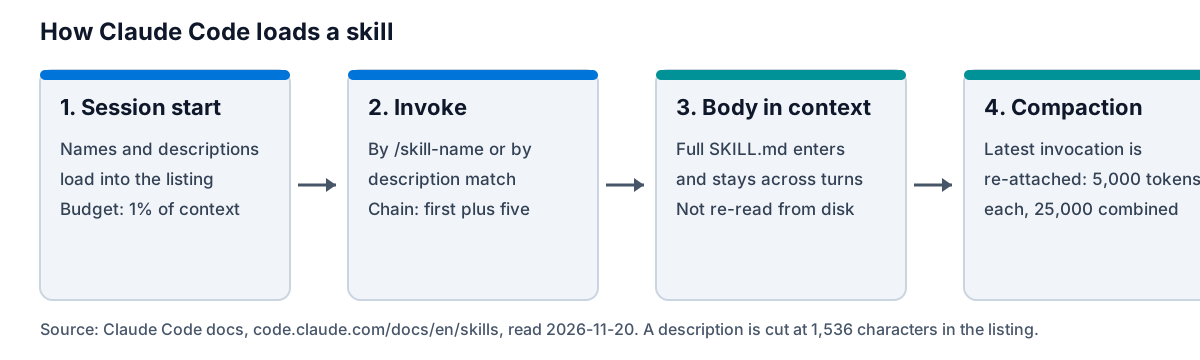
Loading is the part of Claude Code skills that most people get wrong. At launch, Claude Code loads the skill listing: every skill name, plus as many descriptions as fit. The docs say "full skill content only loads when invoked." Once you invoke a skill, its content stays in context across later turns. Claude Code "does not re-read the skill file on later turns."
That detail connects back to Maya. If she edits her skill mid-session, the copy already in context is the one Claude keeps following. The /reload-skills command re-scans the skill folders, so skills added or changed on disk become available. You'll find it in the commands reference.
Invocation has one more rule. Put /skill-name at the start of a message and the skill runs. Put the name in the middle of a sentence and it only gives Claude permission to run it. Set disable-model-invocation: true and the description stays out of context entirely.
How to write a Claude Code skill
Here's the docs' own first Claude Code skill. It summarizes your uncommitted changes. I'm using it verbatim, so you're running what Anthropic published.
- Make the folder. For a personal skill, run
mkdir -p ~/.claude/skills/summarize-changes. For a project skill, use.claude/skills/summarize-changes/in your repository. - Write
SKILL.md. Save this to~/.claude/skills/summarize-changes/SKILL.md:
---
description: Summarizes uncommitted changes and flags anything risky. Use when the user asks what changed, wants a commit message, or asks to review their diff.
---

## Current changes

!`git diff HEAD`

## Instructions

Summarize the changes above in two or three bullet points, then list any risks you notice such as missing error handling, hardcoded values, or tests that need updating. If the diff is empty, say there are no uncommitted changes.
The !`git diff HEAD` line is dynamic context injection. Claude Code runs the command and swaps the line for its output before Claude sees the skill. Source: the "Create your first skill" section of the skills docs.
- Test it. Open a git project, edit a file, and run
claude. Type/summarize-changes. Then ask "What did I change?" to see whether the description loads the skill on its own. - Add fields only when you need them. Four are worth knowing:
when_to_useadds trigger phrases,disable-model-invocationstops Claude loading the skill on its own,allowed-toolslists tools Claude can use without asking during that turn, andcontext: forkruns the skill in a forked subagent.
Three mistakes come up again and again, and the docs name each one:
- A vague description. Claude picks skills by it. Put the key use case first.
- A long body. The docs tip is "Keep
SKILL.mdunder 500 lines." - A rule that must hold every time. The docs say to move it into a hook, because Claude Code runs a hook every time its event occurs, "whether or not Claude is following the skill."
Claude Code skills vs CLAUDE.md vs auto memory
Three features sound alike and do different jobs. The table lays out who writes each one, where it lives and when it loads. The fourth column is Hindsight, so you can see where a memory bank sits.
| Claude Code skill | CLAUDE.md | Auto memory | Hindsight memory bank | |
|---|---|---|---|---|
| Who writes it | A person | A person, or Claude when asked to "add this to CLAUDE.md" | Claude | The plugin retains each session; the skill tells Claude when to ingest |
| Where it lives | ~/.claude/skills/ or .claude/skills/ | ~/.claude/CLAUDE.md, ./CLAUDE.md and parent folders | ~/.claude/projects/<project>/memory/ | One bank per repository, coding-agent::<repo> |
| When it loads | Description at launch, body when invoked | At launch, from the working folder and every folder above it | First 200 lines or 25 KB of MEMORY.md, each session | One reflect on the first prompt of a session |
| Scope | User, project or plugin | The folder tree | Machine-local, one per git repository | Shared by every agent on the repository |
| Changes from use | The docs describe none | Only when edited | Claude adds and edits notes | Each session goes back into the bank |
The docs draw the line between the first two in one sentence: "Unlike CLAUDE.md content, a skill's body loads only when it's used." The skills page also says to create a skill "when a section of CLAUDE.md has grown into a procedure rather than a fact." The memory docs give the size advice for CLAUDE.md, which is a target of under 200 lines per file.
Say you're Tom. His CLAUDE.md has grown to 450 lines, and 120 of them are the release procedure. That's more than twice the 200-line target. Tom moves those steps into a skill. Now one description line loads at launch, and the steps load only when he runs /release. CLAUDE.md goes back to holding facts, and the skill holds the procedure.
Auto memory is the one that surprises people. Claude writes it, as notes of four types: user, feedback, project and reference. It's machine-local, so it doesn't follow you to a second laptop. For how memory behaves across repositories, see Claude Code memory across projects.
Read the Hindsight source on GitHub to see how a memory bank differs from a file.
Limits of Claude Code skills, as the docs state them
The docs give a handful of numbers for Claude Code skills. I've listed each with its source, as read on 2026-11-20, because the docs show no page date.
- Listing budget. It scales at 1% of the model's context window. When the listing overflows, Claude Code can drop descriptions to fit the budget. Names always stay.
- Each listing entry. The combined
descriptionandwhen_to_usetext is truncated at 1,536 characters. - SKILL.md length. The 500-line figure is a tip, not a cap. The docs state no byte limit.
- After compaction. Claude Code re-attaches the most recent invocation of each skill, keeping the first 5,000 tokens of each. Re-attached skills share 25,000 tokens.
- Chaining. The first skill plus up to five more.
- Number of skills. The docs state no maximum.
For contrast, CLAUDE.md has the 200-line target and a hard skip: Claude Code skips a file over 4 MiB.
The practical point is about cost. A long library of Claude Code skills takes description space at every session start, and descriptions can be dropped to fit the budget. So write short descriptions that name the trigger. "Use when the user asks what changed" does more work than three sentences about the skill's history.
What a Claude Code skill does not do
The docs describe no skill that learns from outcomes. A skill records a procedure. It doesn't record what happened when the procedure ran. That's Maya's problem in one sentence.
Can Claude write a Claude Code skill? Sometimes, if you start it. The docs name bundled paths where skill files get written or proposed. /verify "writes what worked to .claude/skills/verify/SKILL.md", and changes the file only when it steered a run wrong. /run-skill-generator commits a per-project skill. /doctor offers to migrate CLAUDE.md guidance into skills. Each one starts with a person running a command. That's useful, but it isn't a skill that improves itself after every session.
The other question people ask is skills vs MCP. The Hindsight Coding Agents plugin shows the split in practice. It adds an MCP server with claude mcp add, and it installs a skill at ~/.claude/skills/hindsight-coding-agent. The MCP server gives Claude the tools. The skill tells Claude when to use them. For the MCP side of memory, see memory MCP servers compared.
So the skill is the instruction, and the memory service is where the learning lives. That's the core of what I'd argue: a skill is a procedure a person writes down, and memory that learns is a separate layer.
Add memory that learns to Claude Code
One line installs the Hindsight Coding Agents plugin for Claude Code. This is the line from the Coding Agents page:
npx @vectorize-io/hindsight-coding-agents install claude-code
It writes three hooks to ~/.claude/settings.json, adds an MCP server at user scope, and installs the skill hindsight-coding-agent. Then it works without you doing anything. Each repository maps to a bank named coding-agent::<repo>. The raw SKILL.md says "There is NO ingest command to run." The first prompt of a session triggers one reflect that's injected into context, and the session transcript is retained when it ends. The server can run on Hindsight Cloud (the default), a self-hosted server or a local daemon.
The skill file also tells Claude how to use that memory. It names hindsight_search_pages as the "FIRST STOP for project questions", and hindsight_reflect for "WHY questions and exact decided values". It has a rule for stale memory too: "FIX THE RECORD." If Claude verifies that served memory is wrong, it writes a Correction: <topic> document into the bank. That's a skill doing what skills do well, which is telling Claude how to behave, while the bank keeps the result.
Picture Priya. She runs Claude Code and Codex on one repository. With the plugin, both agents read from and write to a single bank, coding-agent::<repo>. On Monday a Codex session finds the test suite needs a local Redis. On Tuesday her first Claude Code prompt gets a reflect from that bank. She never wrote the fact into a skill or a CLAUDE.md file.
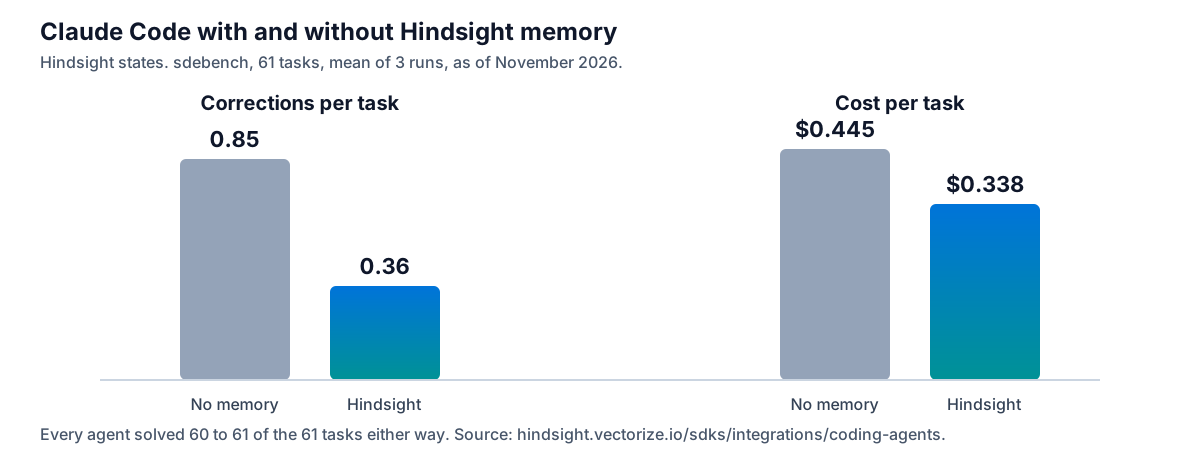
Here's the evidence. Hindsight states that on its sdebench run, a coding agent over 61 real repository tasks with three runs each, Claude Code went from 0.85 to 0.36 corrections a task and from $0.445 to $0.338 a task, as of November 2026. Every agent solved 60 to 61 of the 61 tasks either way, so memory changed what it costs to get there. See the Hindsight benchmark results for the full set.
Frequently Asked Questions
Do skills work in Claude Code?
Yes. Claude Code loads a skill from ~/.claude/skills/, from .claude/skills/ in a repository, or from a plugin. Claude applies a skill when its description matches your request, or you invoke it by typing /skill-name. The command /reload-skills re-scans the skill folders, so skills added or changed on disk become available.
What is the best skill for Claude Code?
The best one is the skill for a procedure you keep repeating. Start with /verify, the bundled skill the docs name, then write your own for your release steps or review checklist. Judge a skill by whether its description fires at the right moment.
How do I run a skill in Claude Code?
Type /skill-name at the start of your message, or ask for something that matches the skill's description. You can stack skills in one line: Claude Code expands the first skill plus up to five more. A name in the middle of a sentence only gives Claude permission to run it.
Are custom slash commands the same as skills?
Nearly. The skills page states "Custom commands have been merged into skills." Your existing .claude/commands/ files keep working. A skill with the same name as a command takes precedence.
Is a Claude Code skill the same as a subagent?
No. A skill is instructions that load into a conversation. A subagent is a separate agent with its own system prompt. The two meet in two places: a skill with context: fork runs in a forked subagent, and a subagent's skills field preloads skills into it.
Conclusion
Claude Code skills are the right home for a repeatable procedure. They're the wrong home for what your runs teach you. Five actions follow:
- Write each skill's
descriptionas the trigger, and put the key use case first. - Keep the
SKILL.mdbody under 500 lines. - Move any rule that must hold every time into a hook.
- Keep facts in CLAUDE.md and procedures in skills.
- Add a memory bank for what the runs teach.
In order: write one skill, run it with /skill-name, then install the Coding Agents plugin and watch the second session start with what the first one learned.
Start with Hindsight Cloud. The bank starts learning from your first session, and the plugin installs with one line. If you'd rather keep everything on your own machines, Hindsight is open source (MIT) and runs on your own Postgres. Your Claude Code skills stay exactly as they are. The bank adds the layer they can't.
Further Reading
- Claude Code memory: how Claude Code remembers your project
- Claude Code memory across projects
- Memory MCP servers compared
- AI agent memory