Claude Code vs Cursor 2026: Memory, Plans, Which to Pick
Picture Maya. She writes "use pnpm, not npm" into a rule file under .cursor/rules in Cursor. The next morning she opens Claude Code in a terminal on the same repo, and it runs npm install. The rule sat in a folder that Claude Code's memory docs never list. They list CLAUDE.md files and .claude/rules/.
If you search Claude Code vs Cursor, you want to know how the two differ and what you lose or gain by switching. Here is the short answer. Claude Code is a terminal agent from Anthropic. Cursor is an AI code editor from Anysphere. Pick by how you work, not by a winner. Both start from files a person writes, and only Claude Code also writes notes itself, on one machine.
That last point is the one the ranking pages skip. They spend their length on features and price. None of the pages for this term that we read in November 2026 compares how each tool keeps context between sessions. This page does. It is an AI agent memory question, and I build Hindsight, the memory layer that plugs into both tools. I compare Claude Code and Cursor on facts from each tool's own docs, read in November 2026, and I say where Hindsight fits.
Below: a side-by-side table, how each tool works, what each one remembers, prices, which to pick by task, and how to run both on one memory.
Claude Code vs Cursor at a glance
| Claude Code | Cursor | |
|---|---|---|
| Maker | Anthropic | Anysphere |
| Interface | Terminal agent, plus a VS Code extension | AI code editor, plus a Cursor CLI |
| Instruction files | CLAUDE.md (user, project, local, subdirectories), .claude/rules/ | .cursor/rules/*.mdc (four rule types), User Rules, Team Rules, AGENTS.md |
| Size advice in the docs | Under 200 lines per CLAUDE.md. A file over 4 MiB is skipped | Rules under 500 lines |
| Memory the tool writes | Auto memory: MEMORY.md plus topic files per repository, on one machine | The current docs list no Memories feature (it shipped in 2025) |
| Lowest paid plan with the tool | Pro, $20 a month | Plus, $8 a month (Grok models only) |
| Hindsight path | Coding Agents plugin, install claude-code | pip install hindsight-cursor (editor), install cursor-cli (CLI) |
The table shows two tools that solve the same problem from different places. Both read instructions from files in your repo or your home folder. Only Claude Code documents a feature where the tool itself writes notes for later. If you also weigh OpenAI's agent, I compared that one with Claude Code in Codex vs Claude Code.
See how the Hindsight Coding Agents plugin gives Claude Code memory that carries across sessions.
How Claude Code and Cursor work: terminal agent vs AI editor
Claude Code is an agent you run in a terminal on your repo. It reads and edits files and runs commands. Its docs say it saves sessions "continuously to local transcript files as you work", and you reopen one with claude --continue or pick one with claude --resume. It also has a VS Code extension, which the IDE docs describe as "a native graphical interface for Claude Code, integrated directly into your IDE." The terminal is the home. The editor panel is an add-on.
Cursor is an editor with an agent, chat and Tab completion inside it. You work in files, and the agent works beside them. Cursor's Rules docs say rules "do not impact Cursor Tab or other AI features", and that when a rule applies, its contents go in "the start of the model context."
Think of a pair programmer. Claude Code is the one who sits in your shell and works through the repo while you watch the diff. Cursor is the one who sits in your editor window, next to the file you have open. Both edit files. The difference is where you watch and where you steer.
The models differ too. Claude Code runs Anthropic's models, and its docs name Opus 5.5 as the default on Pro, Max, Ultra, Team, Enterprise and the Anthropic API. Cursor lists its own models in its docs: Grok 4.7, Grok 4.6, Grok 4.5 and Composer 2.5. Third-party models are billed separately, which I cover in the pricing section.
What Claude Code and Cursor remember between sessions
This is the part the other pages skip, so it gets the most room.
Claude Code: CLAUDE.md and auto memory
Claude Code starts from files. Per the memory docs, it "loads CLAUDE.md and CLAUDE.local.md from your current working directory and every directory above it." The order runs from the filesystem root down to your working directory. Files in subdirectories load later, once Claude reads or edits a file there. The @path/to/import syntax pulls in other files, up to four hops deep.
The docs advise a target of under 200 lines per CLAUDE.md. That is advice, not a cap. A file over 4 MiB is skipped, and none of it loads.
Auto memory is the second layer. Claude Code writes notes of four types (user, feedback, project and reference) to ~/.claude/projects/<project>/memory/. It keeps a MEMORY.md index plus one topic file per memory. The first 200 lines or 25 KB of MEMORY.md load at the start of every conversation. The docs state that "Auto memory is machine-local." You add a memory by asking Claude ("remember that the API tests require a local Redis instance") or by editing through /memory. For the full picture, read my guide to Claude Code memory. Skills sit beside both: a skill body loads only when used, unlike CLAUDE.md, as I explain in Claude Code skills explained.
Cursor: rules, AGENTS.md and the Memories question
Cursor starts from rules. Project rules live in .cursor/rules and must use the .mdc extension. A plain .md file there is ignored because it has no frontmatter. Each rule has one of four types, named in the docs:
- Always Apply: applied to every chat session.
- Apply Intelligently: applied when the agent decides it's relevant, based on the description.
- Apply to Specific Files: applied when a file matches a pattern.
- Apply Manually: applied when you @-mention it in chat.
When rules conflict, the order is Team Rules, then Project Rules, then User Rules. Cursor also supports AGENTS.md in the project root and in subdirectories, as a plain-markdown alternative. The docs advise keeping rules under 500 lines.
The Rules docs are blunt about the limit: "Large language models don't retain memory between completions. Rules provide persistent, reusable context at the prompt level."
Two older items need care. Cursor's help article calls the .cursorrules file legacy and says it "will be deprecated". And Cursor shipped Memories in 2025: the changelog for version 1.0 says that "Cursor can remember facts from conversations and reference them in the future." Cursor's current docs do not list that feature.
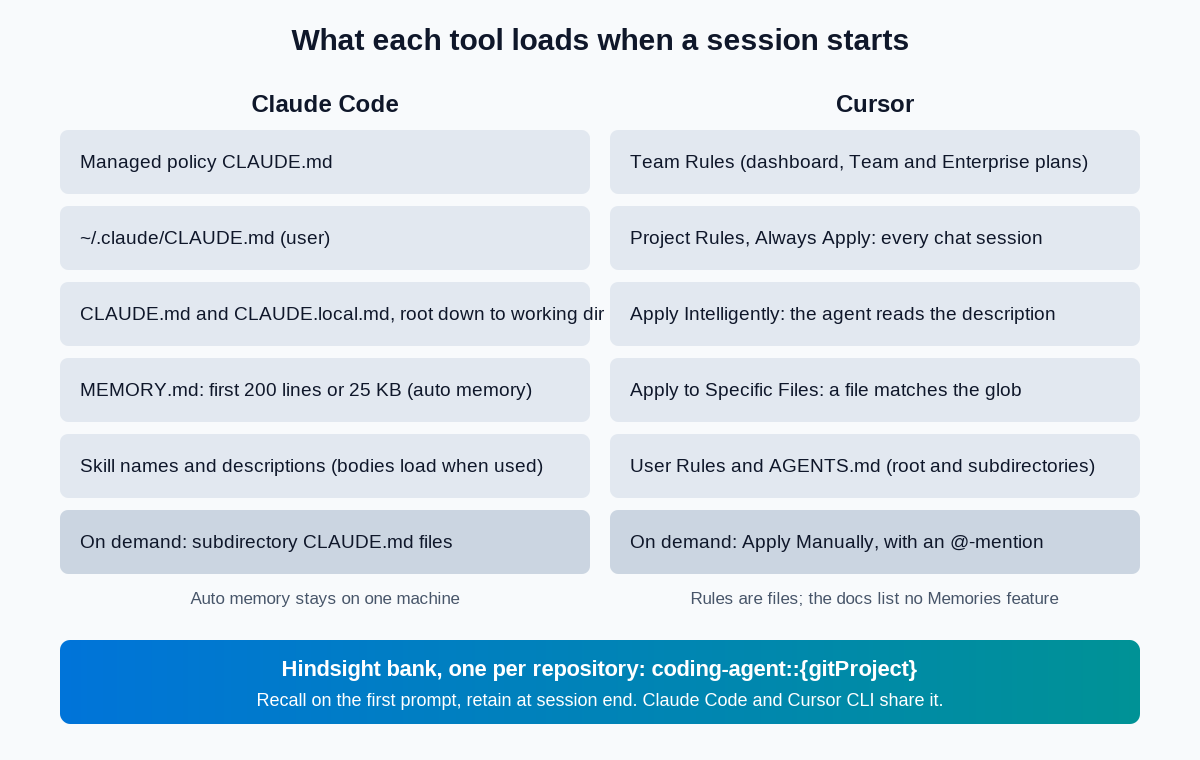
Say you are Tomás. On Tuesday you find that the API tests need a local Redis instance. Claude Code can save that to auto memory on your laptop. Your desktop has no copy of it. Cursor keeps the fact only if you write it into a rule. Neither tool's docs describe a step that checks that fix against the outcome of the next run. If the rule is wrong, or the test setup changes, the file stays as you wrote it.
That is the pattern in both tools. A file a person writes is instructions, not memory that learns. Instructions are worth having. They do not tell an agent what happened the last time it followed them.
Claude Code vs Cursor pricing (as of November 2026)
Prices below come from each vendor's published plans, read in November 2026. Cursor's pricing docs list its plans and its usage pools.
| Tool | Plan | Monthly price | What the page says about usage |
|---|---|---|---|
| Claude | Free | $0 | No Claude Code |
| Claude | Pro | $20 ($17 a month billed annually) | Includes Claude Code. Five-hour and weekly limits |
| Claude | Max | $100 | 5x Pro usage |
| Claude | Ultra | $200 | 10x Pro usage each week. No 5-hour limit for verified accounts |
| Claude | Team standard / premium seat | $25 / $125 ($20 / $100 billed annually) | More usage than Pro / 5x standard seats |
| Cursor | Free | $0 | Limited agent and chat requests |
| Cursor | Plus | $8 | Shared usage pool. Grok models only |
| Cursor | Premium | $30 | 4x Plus usage |
| Cursor | Super | $100 | 15x Plus usage |
| Cursor | Ultra | $200 | 50x Plus usage |
Cursor Teams starts at $30 a user a month, per Cursor's pricing docs. Both vendors have an "Ultra" plan at $200 a month, and the two are different plans.
The price models differ. A Claude plan counts Claude Code against Anthropic's usage limits, which the limits article describes, and Claude Code is included on Pro and above. Cursor counts a weekly pool, stated as a multiple of Plus, and Cursor states no dollar value for the pool. Third-party models on Cursor are billed separately by usage, at the model's API list price, on Premium and above.
For scale, Anthropic's cost docs state that in enterprise deployments the average cost is around $13 per developer per active day, and $150 to $250 per developer per month. That is a usage figure, not a plan price.
Claude Code or Cursor: which to pick by task
Pick by the work in front of you. Each case below rests on a fact from the tools' docs.
You drive long, multi-file changes from a shell. Claude Code is a terminal agent. It saves sessions you can resume with claude --continue, and it loads CLAUDE.md from your working directory upward.
You edit in a window and want the agent next to your files. Cursor is an editor. The agent, chat and Tab completion sit in the same window, and the Free plan includes Tab completions.
Your team wants shared rules set from one place. Cursor's Team Rules are managed from a dashboard and available on Team and Enterprise plans. Claude Code has a managed policy CLAUDE.md at a system path.
Your team keeps instructions in the repo. Either tool works. CLAUDE.md and .claude/rules/ live in the repo for Claude Code. .cursor/rules and AGENTS.md live in the repo for Cursor. Keep the content of the two sets in step, or you get Maya's problem.
You already pay for one plan. A Claude Pro plan includes Claude Code. A Cursor plan prices its own pool and bills third-party models separately. Check which of your current plans already covers the tool you are weighing.
I don't tell anyone to drop either tool. The next section is about running both.
Using Claude Code and Cursor together, with one memory
The instruction files do not cross over on their own. Claude Code reads CLAUDE.md. Cursor reads its rules and AGENTS.md. A fact you tell one tool stays with that tool.
Hindsight adds a memory layer to both. It is open source (MIT) and runs on Postgres. You set it up per tool, and the two paths are not identical.
Claude Code. One command, from the Coding Agents plugin:
npx @vectorize-io/hindsight-coding-agents install claude-code
It writes three hooks to ~/.claude/settings.json, adds an MCP server, and installs a skill at ~/.claude/skills/hindsight-coding-agent. Memory is per repository, in a bank named coding-agent::<repo>. Recall runs on the first prompt of a session, and the session transcript is retained at the end.
Cursor CLI. The same package covers it:
npx @vectorize-io/hindsight-coding-agents install cursor-cli
Claude Code and Cursor CLI share one bank for a repository by default.
Cursor editor. The editor uses a separate plugin, documented on the Hindsight Cursor page:
pip install hindsight-cursor
hindsight-cursor init --api-url https://api.hindsight.vectorize.io --api-token YOUR_HINDSIGHT_API_TOKEN
Then quit and reopen Cursor, because plugins load at startup. The editor plugin recalls at session start and retains every 10 turns by default. Its bank id defaults to "cursor", so it does not share the Claude Code bank unless you change that setting.
Picture Priya and Sam on one repo. Priya uses Claude Code. Sam uses Cursor CLI. Both installs point at one repository bank. On Monday, Priya's session records why the team moved the job queue to Postgres. On Wednesday, Sam's first prompt recalls that decision before he touches the queue code.
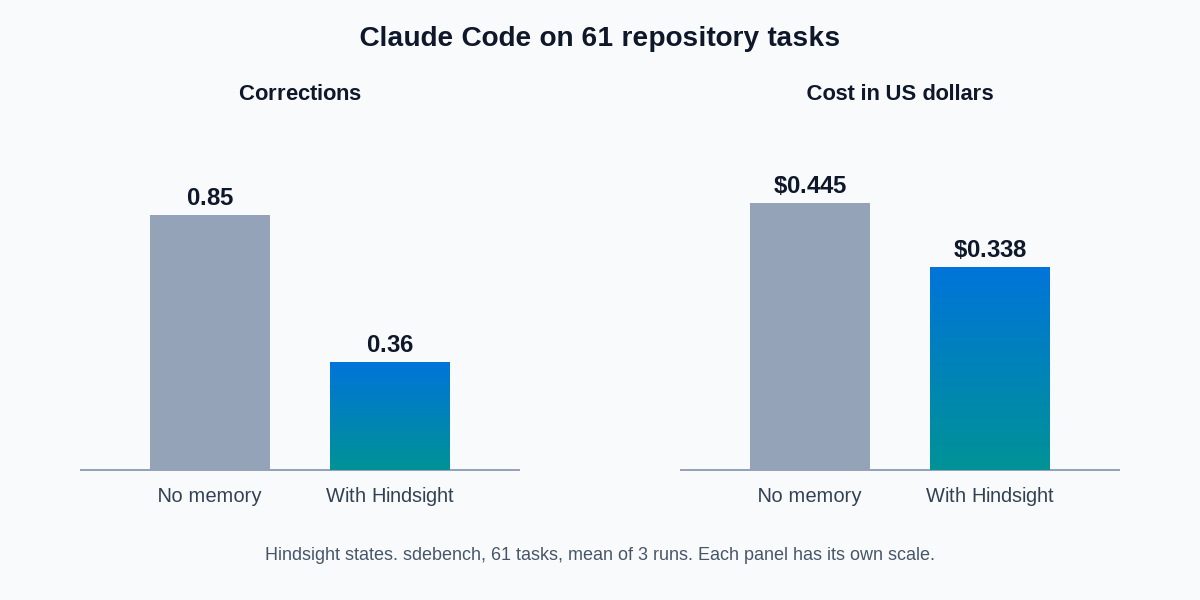
Does it help? Hindsight states a result for Claude Code on its sdebench run: 61 real repository tasks, mean of 3 runs. Corrections fell from 0.85 to 0.36, and cost fell from $0.445 to $0.338. The page states that the agent solves 60 to 61 of the 61 tasks either way, so memory changes what the work costs. No Cursor row is used here. More results sit on the Hindsight benchmark results page.
If your agents use other tools too, see memory MCP servers compared and agent memory systems compared.
View Hindsight on GitHub and read the source before you install it.
Claude Code vs Cursor: takeaways and next steps
- Put repo instructions in the file each tool reads: CLAUDE.md for Claude Code,
.cursor/rulesor AGENTS.md for Cursor. - Keep CLAUDE.md under 200 lines and each Cursor rule under 500.
- Check where auto memory lives before you switch machines. It is machine-local.
- Pick the tool by task, and use both when the work calls for both.
- Add one memory layer that both tools share, so a fix found in one session reaches the next.
Next steps, in order. Install the Coding Agents plugin for the tool you use most. Install it for the second tool. Run a week and see what the first prompt of each session recalls. Hindsight is MIT open source and also runs self-hosted, so you can start without a contract. When you want it managed, start on Hindsight Cloud.
Frequently Asked Questions
Is Cursor better than Claude Code for coding?
No single winner. The two differ in where you work. Claude Code runs as a terminal agent. Cursor is an editor with Tab completion and chat. Cursor Free includes Tab completions, and Claude Code needs Pro or above. Cursor's Premium plan is $30 a month and Claude Pro is $20 a month, as of November 2026.
Can Claude Code replace Cursor?
Claude Code is a terminal agent with a VS Code extension, and Cursor is an editor. If you rely on an editor's file tree and inline completion, you still need an editor. Claude Code reads CLAUDE.md files from your working directory upward, while Cursor reads rules from .cursor/rules, so a switch means moving your instructions.
Can I run Claude Code in VS Code?
Yes. Anthropic's docs describe a VS Code extension for Claude Code. It bundles its own copy of the CLI for the chat panel. To run claude in VS Code's integrated terminal, you need the standalone CLI install. The extension also installs in forks like Devin Desktop or Kiro.
Is .cursorrules still supported?
Cursor calls the .cursorrules file legacy and says it "will be deprecated". Its help article gives one migration step: create a rule and set its type to Always Apply, which matches the old behavior. Move your instructions into .cursor/rules now.