Claude-Mem Review: How It Works, Cost, Privacy and Limits
Claude-mem has about 119,000 stars on GitHub, and its own README says: "Memory injection starts on your second session in a project." That one sentence tells you what the plugin is. It does not remember your first session while you are in it. It records the session and replays a summary of it into the next one.
Every Claude Code user knows the cost of starting cold. You explain the repository, the test command and the odd migration rule again, and the agent nods as if it has never heard any of it. This claude-mem review covers what the plugin records, where it keeps the data, what leaves your machine, what it costs and where it stops.
The short answer: claude-mem is an Apache-2.0 plugin, mainly for Claude Code, that records each session through hooks and injects compressed summaries into later sessions. Recording and replaying sessions is one part of AI agent memory.
Here is what follows:
- What claude-mem is and who writes it
- How the capture path works, from hook to database
- How to install it, and the two mistakes people make
- What it stores and what leaves your machine
- What it costs as of November 2026
- Its limits, with links to the issue tracker
- How it differs from Claude Code's own memory and from Hindsight
I read the repository, the docs and the pricing page in November 2026. I build Hindsight, a memory system for coding agents, so I say where the two differ. My position: a record of what the agent did is not memory that learns. Section seven argues it.
What claude-mem is
Claude-mem is a plugin by Alex Newman (@thedotmack). The claude-mem repository is Apache-2.0 licensed. On 2026-11-23 it showed version 16.1.0, 119.2k stars, 10.4k forks, 61 open issues and 4,878 commits. The project site, claude-mem.ai, redirects to cmem.ai, which sells the hosted tiers.
The repository describes it as "Persistent Context Across Sessions for Every Agent". It is mainly for Claude Code, with other agents supported. The project docs list Cursor, Windsurf, OpenCode, Codex CLI, Antigravity CLI and OpenClaw. The README says it works with "Claude Code, Codex, Cursor, OpenCode and 11 more agents".
Say you're Priya, a backend developer on a Django repository. On Friday her Claude Code session fixes a failing migration and learns that the staging database needs a manual index. On Monday she opens a second session. Claude-mem injects a summary of Friday's work, so the agent starts with the migration in mind. If Priya had opened a new project on Monday, the plugin would have had nothing to inject. It replays a record of past sessions in the same project.
The plugin installs with one npx line, and the README lists no API key as required. That is the whole install cost. For the wider field, see agent memory systems compared.
If you want to see the other approach while you read, see how the Hindsight Coding Agents plugin recalls project memory on the first prompt. It sets one bank per repository and recalls on the first prompt of every session, including the first one.
How claude-mem works
Think of a flight recorder and a clerk. The recorder writes down every action. The clerk reads the log after the flight and writes a short summary. Claude-mem has the same two parts.
The recorder is a set of hooks. Claude Code runs a hook at defined events, and claude-mem uses each one to hand the event to a local worker. The README lists nine: Setup, SessionStart, UserPromptSubmit, PreToolUse, PostToolUse, PostToolUseFailure, Stop, SubagentStop and SessionEnd. The docs introduction lists five lifecycle hooks: SessionStart, UserPromptSubmit, PostToolUse, Summary (Stop) and SessionEnd. The two pages disagree, and the README is the longer list.
The worker is an Express HTTP API that Bun manages. The docs give its default port as 37700 + (uid % 100) and its default host as 127.0.0.1.
The clerk is a second agent, the observer. It reads what the hooks captured (what the agent read, edited and ran) and turns it into observations and an end-of-session summary.
Storage has two layers. SQLite at ~/.claude-mem/claude-mem.db holds sessions, observations and summaries. Chroma adds semantic search on top of the keyword search of SQLite. The README says: "Your memory lives in ~/.claude-mem on your machine."
Retrieval has two sides. At the start of a later session, the plugin injects summaries. During a session, the agent can call MCP tools. The README names search, timeline and get_observations. It also names smart_search, smart_outline, smart_unfold and save_memory. A web viewer at /viewer on the worker URL shows memory, sessions and settings. For how these tools compare with other servers, see memory MCP servers compared.
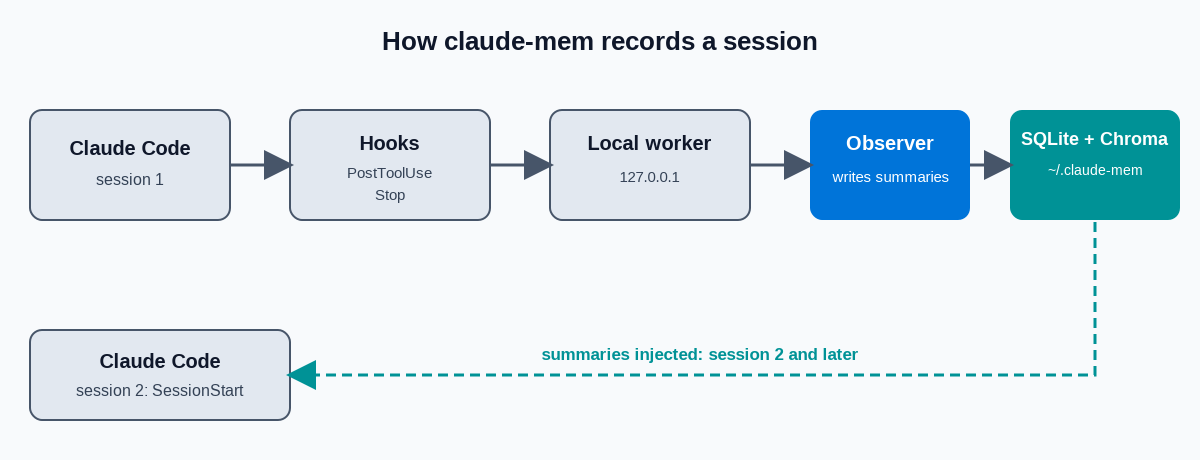
Read the diagram left to right. Nothing flows back into the session you are in, until Stop and SessionEnd have written the summary. The return arrow goes to the next session. That is the "second session" rule of the README, drawn out.
How to install claude-mem
Installing takes four steps. The steps below come from the README.
- Check Node.js. The README requires 20.19 or later in the 20.x line, or 22.12 or later. Bun and uv install themselves if missing. SQLite 3 is bundled.
- Run the installer. Use
npx claude-mem install. Or, inside Claude Code, add the marketplace and install the plugin. - Choose the observer. After sign-in you pick a memory provider: the claude-mem observer, your own OpenRouter or Gemini key, or your Anthropic plan. Sign-in is an email magic link with no card required to sign in.
- Open a second session in the same project. Restart Claude Code. The README says: "Context from previous sessions will automatically appear in new sessions."
npx claude-mem install
/plugin marketplace add thedotmack/claude-mem
/plugin install claude-mem
Two mistakes cost people an hour. First, npm install -g claude-mem installs the SDK and library only. The README says it does not register hooks or the worker, so nothing gets recorded. Second, people look for memory in the first session. Injection starts on the second.
The plugin also installs for other agents with --ide flags, for example npx claude-mem install --ide opencode. If you want to extend Claude Code in other ways, Claude Code skills are the file-based route, and a person writes each one.
What claude-mem stores and what leaves your machine
Is claude-mem safe to use? The answer depends on four settings you control. All four come from the docs.
Storage is local. Everything sits in ~/.claude-mem. The README says cloud sync is opt-in. The cloud sync docs are specific about what sync uploads: "your observation narratives and your full prompt text" go to the sync hub under your cmem.ai account. The same page says: "Don't enable it if that content must stay on your machine."
Private tags keep text out of the database. The README says: "Wrap anything in <private> tags and it never gets stored." The private tags page draws the line more narrowly. Claude can see the tagged content during the current session. The tags are stripped during storage, not from the live conversation. The docs also offer regex-based auto-redaction for secrets.
Telemetry is on by default. The README says anonymous usage analytics are on by default, and npx claude-mem telemetry disable turns them off. The telemetry page names PostHog as the processor and says events carry a random install UUID. It lists what is never collected: prompts or conversation content, search queries, project or repository names, and emails or usernames. Redacted error messages and stack traces are collected, and CLAUDE_MEM_TELEMETRY_ERRORS=0 turns that off. Four opt-outs exist: DO_NOT_TRACK, CLAUDE_MEM_TELEMETRY=0, a telemetry.json setting and the disable command.
The observer sends session text to a model. Whichever provider you pick sees what the hooks captured. The OpenRouter page says the full conversation history is sent to the model on each request. The Gemini page says memory runs off-plan on your Gemini key. With your Anthropic plan as the provider, the observer shares your account. The docs set the worker's host to 127.0.0.1 by default. They list a local API token setting, CLAUDE_MEM_LOCAL_API_TOKEN, with an empty default that means off.
Picture Marcus, who pastes a staging database URL into a prompt while a tool call reads a config file. The hooks capture the tool call. The <private> tag protects only the text he wrapped before the capture, and the config file read is not wrapped. The user decides what to keep out, and the decision comes before storage, not after.
The table below puts four kinds of memory side by side. It shows who writes each one and where it lives.
| Memory | Who writes it | Where it is stored | When it loads | Scope | Corrects itself from results |
|---|---|---|---|---|---|
| CLAUDE.md | A person | Files in the repository and ~/.claude/CLAUDE.md | At launch, from the working directory and every directory above it | Files you choose | No |
| Claude Code auto memory | Claude | ~/.claude/projects/<project>/memory/ | First 200 lines or 25KB of MEMORY.md, each session | One machine, one repository | No. Notes stay until you or Claude edit them |
| claude-mem | Hooks plus an observer agent | ~/.claude-mem (SQLite and Chroma) | Injected from the second session in a project | One machine. Cloud sync is opt-in | Retrieval returns recorded observations and summaries by search |
| Hindsight Coding Agents plugin | Hooks write the transcript at Stop. Claude adds documents on request | A Hindsight bank per repository, coding-agent::{gitProject} | Recall on the first prompt of each session | One bank per repository, shared by every agent on it | Yes. The skill tells Claude to record a Correction: document |
Sources: the Claude Code memory docs, the claude-mem README and docs, and the Hindsight Coding Agents page.
claude-mem pricing
The plugin is free and open source. The cost sits around it: the observer's model calls and the hosted tiers. The pricing page on cmem.ai lists these options as of November 2026.
| Option | Price as of November 2026 | What it covers |
|---|---|---|
| Open-source plugin | Free | Capture, local search and session history. Model or provider usage may have a separate cost |
| Cloud Sync | $12 a month after a 30-day trial, card required. Or $99 a year, no trial | Sync of your memory and private MCP recall. You keep your own model provider |
| Hosted tokens, Pro | $30 a month | $30 monthly generation allowance |
| Hosted tokens, Heavy | $70 a month | $49 monthly generation allowance |
| Hosted tokens, CMEM Max | $100 a month | $70 monthly generation allowance. Extra usage is billed at provider cost divided by 0.7 |
The hosted-token plans are a separate subscription from Cloud Sync. The pricing page says every hosted-token plan is paid from day one, with no trial. The README describes a 30-day free trial that starts when you choose the claude-mem observer, on a checkout page that asks for a payment method. The two pages describe the trial differently, so read the checkout page before you enter a card.
If you bring your own provider key, the cost is whatever OpenRouter or Gemini charges for the observer's calls. The README says that when a trial ends, memory falls back to your Anthropic plan unless you subscribe.
The Hindsight comparison is simple. Hindsight is open source under the MIT licence and runs on Postgres. The Coding Agents page lists three server modes: Cloud, which needs an API token, self-hosted, which needs a URL, and a local daemon, which needs uv and an LLM key for extraction.
claude-mem limits and known issues
A review earns its keep in this section. Each limit below has a source.
Injection starts on the second session. The README says: "Memory injection starts on your second session in a project." For a new repository, the first session runs with no help. A teammate who clones the repository gets no memory from yours, because storage is local to each machine unless cloud sync is on.
The token figures are not a measured saving. The README describes index rows as about a tenth the size of a full record, roughly 50 to 100 tokens against 500 to 1,000. It adds that the ratio "is not a measured recall or end-to-end saving". The older "~10x token savings" wording left the README after issue #4138, which called the claim unverifiable. The issue is closed.
The published results use no shared benchmark. Claude-mem states, on its research page, that on 133 SWE-bench Verified tasks, three runs per task, it scores 42.6% with memory against 35.3% without. The page also reports a second-place finish among 15 commercial entries in the Agent Memory Challenge, Cycle 1, at 52.00%. These figures compare the plugin with itself or with one challenge's entries. They use neither LoCoMo nor LongMemEval, so no score here sits next to a score from another system. For how those benchmarks work, see the Hindsight benchmark results.
The repository shows 61 open issues. That is the count on 2026-11-23. One example is issue #6319: on macOS the observer reports "Not logged in" although the Claude Code CLI is logged in, and no observations are saved. The owner says a log-level fix shipped, and the account-mismatch cause is still open.
A record keeps what happened. The docs introduction names summaries injected at session start, MCP search tools, FTS5 search and a Chroma vector index as the retrieval parts. Each one returns what was recorded. It matters in the next section.
claude-mem vs Claude Code memory and Hindsight
How is claude-mem different from Claude's own memory? Claude Code has two built-in layers, both described in the Claude Code memory docs. CLAUDE.md is a file a person writes, loaded at launch. Auto memory is notes Claude writes to ~/.claude/projects/<project>/memory/, and the first 200 lines or 25KB of MEMORY.md load at the start of each session.
Claude-mem adds a third layer. It records tool calls through hooks, a second agent writes summaries, and SQLite and Chroma keep them on your machine. Claude's built-in memory holds what a person or Claude chose to write down. Claude-mem holds a compressed record of what happened.
Hindsight takes the other side of one argument. A record is not memory that learns. The Hindsight Coding Agents plugin installs with one line:
npx @vectorize-io/hindsight-coding-agents install claude-code
It writes three hooks, an MCP server and a skill, hindsight-coding-agent. The memory lives in one bank per repository, coding-agent::{gitProject}, shared by every agent on that repository, so Codex vs Claude Code readers get the same bank in both tools. It runs on Cloud, self-hosted or as a local daemon, and the code is MIT licensed on Postgres. On the first prompt of a session it runs a deep synthesis, reflect, and injects the result. It retains the transcript at Stop, so session one is recalled in session two and the first session is not blind.
The learning point sits in the skill. When Claude verifies that something Hindsight served is wrong or outdated, the skill file says: "FIX THE RECORD — don't just ignore it." Claude then ingests a document titled Correction: <topic> with what memory claimed, what is true now and the evidence. The skill adds: "Newer facts supersede older ones in retrieval, so one clear correction permanently outranks the stale memory." As of November 2026, the Hindsight Coding Agents page states results for 61 repository tasks, three runs each, with and without memory. For Claude Code, corrections per task fell from 0.85 to 0.36, and cost per task from $0.445 to $0.338 (mean of 3 runs, as Hindsight states). Hindsight also publishes its benchmark results for memory accuracy.
Say Dana runs Claude Code on a TypeScript monorepo. In session one, the agent runs the wrong test command and the run fails. A person gives the right command. A record keeps both commands, in order, and a later summary may mention either. A memory that learns keeps the command that worked and marks the old one as wrong, so session two does not retry it. That gap is the core message of this page.
To compare more setups, see Claude Code memory and Claude Code memory vs Mem0 vs Hindsight.
View Hindsight on GitHub to read the code, the skill and the benchmark harness.
What to do next
- Decide what you need: a record of sessions, or memory that corrects itself from results.
- Turn off telemetry and set
<private>tags before the first capture, if you install claude-mem. - Keep Claude Code's CLAUDE.md for rules you write by hand. Neither plugin replaces it.
- Run the Hindsight install line on one repository, work two sessions, and see what the first prompt recalls.
- Start on Hindsight Cloud, or self-host the MIT-licensed code.
Frequently Asked Questions
Does claude-mem actually work?
It does what its README describes: it records tool calls, writes summaries and injects them from the second session on. Claude-mem's own test shows 35.3% without memory and 42.6% with it on 133 tasks. Those are the project's figures, and no shared benchmark backs them.
What is claude-mem for?
Claude-mem carries context between Claude Code sessions. Hooks record what the agent reads, edits and runs. An observer agent writes summaries, and the plugin injects them into later sessions in the same project. It records past work and retrieves it by search.
Is claude-mem safe to use?
Memory stays in ~/.claude-mem on your machine, and cloud sync is opt-in. Anonymous telemetry is on by default, and one command turns it off. The observer sends session text to the provider you pick. Wrap secrets in private tags before capture. The data section above gives the details.
Does Claude have a memory now?
Claude Code has two: CLAUDE.md files that a person writes, and auto memory that Claude writes. Auto memory keeps notes in ~/.claude/projects/<project>/memory/ and loads the first 200 lines or 25KB of MEMORY.md at session start. Both are local to one machine.