OpenClaw Memory Explained: How It Works and Why It Forgets
Say you told OpenClaw on Monday that staging runs on pg-staging-02. On Thursday, three long sessions later, it asks you again.
You didn't do anything wrong, and OpenClaw isn't broken. I think the trouble starts with the word "memory," because we hear it and picture something OpenClaw memory isn't. OpenClaw memory is search over Markdown files, and memory is not search. Search finds what somebody already wrote down, as long as the question uses words the index can match. Memory has to decide what's worth keeping, keep it current, and bring it back before anyone asks.
Here's the short answer. OpenClaw memory is plain Markdown in ~/.openclaw/workspace. USER.md and MEMORY.md load when a session starts, daily notes come back only when the agent searches the index, and a fact that never reached a file is gone after compaction.
I don't say that as a complaint, because search is a hard problem and it matters. It's also the half that's easiest to measure. Hindsight scores 94.6% on LongMemEval-S, as of November 2026 (benchmarks). The other half is the part your agent actually feels. I'll show you the whole OpenClaw memory path in one diagram, a table of every cause of loss, and the commands to fix each one. If you'd rather see how Hindsight plugs into OpenClaw first, the OpenClaw local vs cloud memory setup guide walks through it. For the wider picture, start with AI agent memory and come back.
How OpenClaw Memory Works
OpenClaw memory is files, not a database. The agent reads and writes them the way it handles any other file in your workspace, which is why you can open them in an editor and change them yourself. I read through the OpenClaw memory docs end to end for this page, and they name these files:
The OpenClaw memory files
USER.md(optional): stable preferences, communication style and active-project context.MEMORY.md: long-term memory for durable facts and decisions.memory/YYYY-MM-DD.md: daily notes, the running context of one day.DREAMS.md(optional): summaries from dreaming, kept for you to review.memory/imports/codex/,memory/imports/claude-code/andmemory/imports/hermes/: memory imported from other coding agents. OpenClaw indexes these files and doesn't merge them intoMEMORY.md. If you're coming from Claude Code and its memory files, this is where that history lands.
The OpenClaw memory index
On top of the files sits an index. The default engine, called Builtin, is SQLite. With an embedding provider, OpenClaw memory search is hybrid, which means vector plus keyword, and OpenAI embeddings are the default. The docs say hybrid search runs when an embedding provider is configured, and that OpenClaw uses OpenAI embeddings by default.
The two background jobs in OpenClaw memory
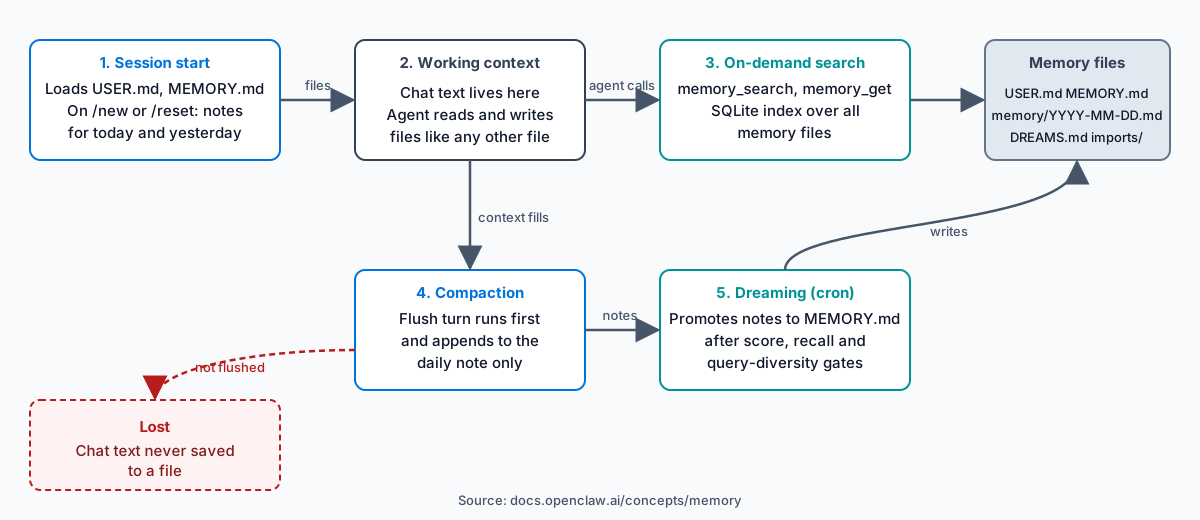
Two background jobs move text between the pieces. A silent flush turn runs before compaction so the agent can save context, and it appends to the daily note and nowhere else. Dreaming runs by default as a cron job: it promotes notes to MEMORY.md once they pass score, recall-frequency and query-diversity gates, and it writes summaries to DREAMS.md.
Think of the files as a notebook and the index as the notebook's search box. Compaction tears a page out of the agent's working context, and whatever wasn't copied into the notebook goes with it. Nothing in the OpenClaw memory loop asks whether a saved fact helped the agent do its job, and that's the gap I keep coming back to.
What OpenClaw Loads and What It Searches
Only two files arrive on their own: USER.md and MEMORY.md. They load at session start, and USER.md gets a separate, smaller budget. That's the whole automatic part of OpenClaw memory.
What OpenClaw memory loads on its own
Daily notes work differently. Today's and yesterday's notes load automatically on a bare /new or /reset, but OpenClaw doesn't inject them on every turn, and it never loads older notes by itself.
What OpenClaw memory only finds by search
Everything else comes back through the memory tools. memory_search finds notes by meaning, even when the wording differs from the original, and memory_get reads one memory file or a line range. The agent has to decide to call them. If it doesn't, the note might as well not exist.
So a fact in a daily note from last week is on disk, but the agent sees it only when it searches with words the index can match. I'd bet this explains most "it forgot" reports you'll read in forums. The agent didn't lose the fact, because it never went to look.
The search mode decides what "words the index can match" means. Picture a developer named Priya who keeps a note that says "preview environment runs on host pv-04". Weeks later she asks the agent where previews are deployed. OpenClaw's search is not hybrid without an embedding provider, so a paraphrased question may not match the note. Neither "previews" nor "deployed" appears in it, and the lookup can come back empty. She'd conclude OpenClaw memory has nothing on it, when the real answer may be a missing embedding provider. That's why openclaw memory status is the first command I'd run.
When OpenClaw memory grows too large
Size matters too. When MEMORY.md grows past the bootstrap budget, the file on disk stays whole but the copy injected into the session gets truncated. Run /context list, /context detail or openclaw doctor to see raw and injected sizes and the truncation status. I'd run that check before blaming the model for a missing fact.
Why OpenClaw Forgets
OpenClaw memory rarely deletes a fact. It loses a fact that never reached a file, or it fails to find a fact that did. Every cause in the table below falls into one of those two groups.
| Cause | Layer | How to check | Fix |
|---|---|---|---|
| The fact stayed in chat and never reached a file | Session context | openclaw memory search "..." returns nothing | Ask the agent to save it to MEMORY.md, or edit the file |
| Compaction ran and the flush did not save the detail | Compaction and flush | Open today's daily note | Confirm agents.defaults.compaction.memoryFlush.enabled is not false |
| The flush was skipped because the workspace is read-only | Flush | Check workspace permissions | Use a writable workspace |
| The fact sits in an older daily note and the agent did not search | Daily notes | openclaw memory search "..." finds it | Promote it to MEMORY.md |
| The OpenClaw memory index is out of date | SQLite index | openclaw memory status | openclaw memory index --force |
| No embedding provider is configured, so OpenClaw memory search is not hybrid and may miss a paraphrase | Search | openclaw memory status | Configure an embedding provider |
Three of those rows deserve more than a line.
The fact that never left the chat. Chat text lives in the session context, and the context is finite. When compaction runs, OpenClaw summarizes the session and details fall out of the summary. Only a file survives compaction, so a fact that matters beyond today has to be in a file before it runs.
The flush that didn't save enough. The flush is a safety net, and a thin one: it's a single silent turn where the agent decides what to write. It appends to the daily note, not to MEMORY.md. Sessions whose sandbox requires read-only or no workspace access skip it entirely. Check today's daily note after a long session, and if the detail isn't there, the flush missed it.
The note nobody searched. This is the quiet one. The fact is on disk and the index has it, but the agent just never asks, and notes older than yesterday don't load by themselves.
Every row in that table is a failure of search, of loading, or of writing something down. None of them is a failure of judgment about what mattered, because built-in memory has no step that makes that judgment. That's the line between a search index and a memory system.
See what that judgment looks like in code: View Hindsight on GitHub.
Now see how the table plays out on a real afternoon. Say you spend four hours on a refactor on 9 November, and in hour three compaction runs. The flush appends a summary to memory/2026-11-09.md, and one line says all handlers use the verbNoun naming rule. The rule sits in the daily note, not in MEMORY.md. On 11 November, /new loads the notes for 11 and 10 November. The note for the 9th doesn't load, and the agent never searches for it, so it names a new handler handlerForUser. You promote the rule to MEMORY.md, and from then on it loads at every session start.
How to Check and Fix OpenClaw Memory, Step by Step
Run these OpenClaw memory checks in order. Each command comes from the docs linked above.
-
Check the OpenClaw memory index. Run
openclaw memory status. It shows whether the index is current and which search provider runs.openclaw memory status -
Search OpenClaw memory for the fact. If the search returns nothing, the fact isn't in any file.
openclaw memory search "pg-staging-02" -
Open the files. Look at
MEMORY.mdand today's daily note in~/.openclaw/workspace. Is the fact where you expect it? The files are the truth, and search only tells you what the index can reach. -
Rebuild the index after a manual edit. The index doesn't follow your editor.
openclaw memory index --force -
Check sizes and truncation. In a session, run
/context list. From the shell, runopenclaw doctor. Both show raw and injected sizes. -
Check the flush and dreaming settings. Look at
agents.defaults.compaction.memoryFlush.enabledandplugins.entries.memory-core.config.dreaming.enabledin your config. Neither should befalseunless you chose that. -
Reset the derived OpenClaw memory data, last. The docs describe
openclaw memory resetin their PostgreSQL memory section. It clears derived memory data and keeps your memory files, your sessions and the search schema. Runopenclaw memory indexafterward to rebuild, and only do all this when the earlier steps fail.
Common OpenClaw memory mistakes
Three mistakes cause most of the trouble: you edit a file and don't re-index, you put a long-term fact in a daily note, or you expect chat text to persist. Most lost facts show up at step 2 or step 3, so you rarely need to go further.
When Built-In Memory Is Not Enough
Files and a local index work for one person and one agent. OpenClaw memory stops working when each workspace holds its own files, because memory then doesn't cross agents or machines, and nothing in the loop learns from what worked.
Match the fix to your situation:
| Your situation | What to do |
|---|---|
| One agent, few facts | Edit MEMORY.md and re-index |
| Facts get lost at compaction often | Check the flush, then promote facts to MEMORY.md |
| Several agents or machines need the same OpenClaw memory, or the agent must learn from what worked | Replace the memory slot with an external memory plugin such as Hindsight |
Replace OpenClaw memory with Hindsight
Hindsight is agent memory that learns: your agents remember your users and get better at their jobs over time. It learns from outcomes, not only from stored and retrieved facts, and that's what I mean when I say memory is not search. For OpenClaw it installs as a plugin. These commands come from the Hindsight OpenClaw integration docs:
openclaw plugins install @vectorize-io/hindsight-openclaw
npx --package @vectorize-io/hindsight-openclaw hindsight-openclaw-setup
openclaw gateway
The plugin runs in one of three modes: Hindsight Cloud, an external Hindsight API that you run, or an embedded local daemon. Before each response, auto-recall injects relevant memories into the context, up to 1,024 tokens by default, and auto-retain stores each turn after it ends. In the default hybrid mode the agent also gets three tools: hindsight_retain, hindsight_recall and hindsight_reflect.
The plugin takes the exclusive memory slot from memory-core. After install, openclaw plugins doctor reports that memory-core isn't selected, and the docs call that expected, not an error. From version 0.12.0 the plugin supports OpenClaw 2026.7.x through 2026.10.x.
Shared OpenClaw memory across agents
Here's where it matters. Picture three developers, Dana, Luis and Mei, each running OpenClaw on a laptop. Each workspace holds its own MEMORY.md, so each has separate OpenClaw memory. On Tuesday Dana's agent learns that the billing service must retry on a 429, and Luis's and Mei's agents never hear about it. Put one Hindsight deployment in external API mode behind all three, and every agent recalls the same fact. The post on OpenClaw shared memory with Hindsight shows the setup.
Other options exist. Supermemory lists an OpenClaw plugin in its repository. For a side-by-side read, see OpenClaw memory with Hindsight, Supermemory and Mem0, or the wider field in the best AI agent memory systems.
What to Do Next
OpenClaw memory fails in predictable places, and five habits cover most of them:
- Keep long-term facts in
MEMORY.md, not in daily notes. - Re-index with
openclaw memory index --forceafter every manual edit. - Leave the flush on, and give it a writable workspace.
- Search before you assume the agent forgot.
- Check
/context listwhenMEMORY.mdgrows long.
Take them in that order. First, run the OpenClaw memory check order from the step-by-step section above. Second, if memory has to be shared across agents, or your agent should learn from what worked, install the Hindsight plugin. Hindsight is open source under the MIT licence, and you can run the embedded mode from the repository.
I'd start there today. You'll know within a day whether the agent stops asking about pg-staging-02.
Start free with Hindsight Cloud, or run the embedded mode from GitHub on one laptop.
Frequently Asked Questions
Where does OpenClaw store memory?
OpenClaw stores memory in ~/.openclaw/workspace. MEMORY.md holds long-term facts, USER.md holds preferences, memory/YYYY-MM-DD.md holds daily notes, and memory/imports/ holds memory imported from other agents. A SQLite index is built from these files.
Does OpenClaw remember between sessions?
Yes, for what reached MEMORY.md or USER.md, which load at session start. Today's and yesterday's daily notes load on /new or /reset. Everything else returns only when the agent calls memory_search. Hermes Agent handles this differently, and its design is worth comparing.
How do I check what OpenClaw remembers?
Run openclaw memory status to check the index, then openclaw memory search "your fact" to query it. Open MEMORY.md and today's daily note to read the files directly. Inside a session, /context list shows what was injected and whether anything was truncated.
Can I replace OpenClaw's built-in memory?
Yes. OpenClaw has an exclusive memory plugin slot, held by memory-core by default. A plugin such as Hindsight can take it. Hindsight runs in three modes: Hindsight Cloud, an external API that you run, or an embedded local daemon on one machine.
Is agent memory the same as RAG?
No. RAG retrieves text that already exists and passes it to the model. Agent memory also decides what to keep, updates it over time, and keeps what helped the agent succeed. Retrieval is one part of memory. Agent memory vs RAG covers when retrieval alone is enough.
Further Reading
- OpenClaw memory with Hindsight, Supermemory and Mem0: the full comparison for OpenClaw users.
- Hermes Agent memory explained: how another coding agent keeps memory.
- Agent memory vs RAG: when retrieval is enough and when it is not.